> ## Documentation Index
> Fetch the complete documentation index at: https://docs.zenrows.com/llms.txt
> Use this file to discover all available pages before exploring further.
# Google ADK
> Build autonomous, multi-agent workflows that can read any website using ZenRows' hosted MCP server with Google's Agent Development Kit (ADK). Plug in scraping and browser automation as native ADK tools, with no orchestration code required.
## Overview
Combine Google's Agent Development Kit (ADK) with the ZenRows MCP server to build autonomous, multi-agent workflows that can read any website in real time. ADK has native MCP support via the `McpToolset` class, so connecting ZenRows takes a single block of code. No function-calling boilerplate, no scraping infrastructure, and no anti-bot tuning required.
This guide covers ADK with Python. ADK also supports TypeScript, Java, Go, and Kotlin. The same MCP integration pattern applies across all of them.
## What is Google ADK?
Google's Agent Development Kit (ADK) is an open-source, code-first framework for building, evaluating, and deploying AI agents. It is model-agnostic and deployment-agnostic, and it is optimized for Google's Gemini models while supporting Claude, GPT, and 100+ other LLMs via LiteLLM.
ADK provides primitives for agent orchestration (`LlmAgent`, workflow agents, multi-agent collaboration), tools (function tools, MCP tools, OpenAPI tools), sessions, memory, and deployment to Vertex AI Agent Engine, Cloud Run, and GKE.
Adding ZenRows MCP gives every ADK agent real-time access to any website, including JavaScript-heavy and bot-protected ones.
### Key benefits
ADK's `McpToolset` wrapper takes the ZenRows server URL and your API key. The agent discovers ZenRows' tools (`scrape` and 30+ browser automation tools) automatically, with no schema mapping to maintain.
ADK agents can scrape one page, decide what to scrape next based on what they read, and chain browser interactions like form fills and clicks across multiple pages. ADK runs the orchestration loop for you.
Premium residential proxies, JavaScript rendering, and stealth fingerprinting come standard. Your ADK agents reach JavaScript-heavy SPAs, Cloudflare-protected sites, and geo-restricted pages without configuration.
ZenRows tools work alongside multi-agent workflows, sequential and parallel agents, sessions, memory, callbacks, evaluation, and tracing. Pass them to one agent or many; the integration is the same.
ADK has first-class deployment paths to Vertex AI Agent Engine, Cloud Run, and GKE. Because the ZenRows MCP server is hosted, your deployed ADK agent connects to it over HTTP, with no MCP server to package or run alongside your agent container.
## Use cases
The Google ADK and ZenRows combination unlocks a wide range of agent workflows:
Agents that visit multiple URLs, follow citations, and synthesize findings from across the web into a single brief.
ADK agents deployed to Agent Engine that take a company name, scrape the company website, find pricing pages and product launches, and write enriched profiles into BigQuery or your CRM.
A research agent that gathers information and hands off to a writing agent that produces the final report, both pulling from live web data. ADK's sequential and collaborative workflows make this pattern trivial.
Scheduled ADK agents that periodically check competitor pricing pages, blog posts, and changelogs, then surface what has changed since the last run.
Agents that navigate multi-step checkout flows, login-walled forms, or job applications using ZenRows' browser tools.
## Getting started
Build a single ADK agent equipped with ZenRows MCP that can answer questions by reading any website in real time.
### Prerequisites
* Python 3.10 or higher
* A ZenRows API key (Find it in your ZenRows dashboard)
* A Google API key
### Setup
Install the ADK package with MCP support.
```bash theme={null}
pip install "google-adk[mcp]"
```
Create a `.env` file in the parent folder of your agent directory with your API keys.
```bash .env theme={null}
ZENROWS_API_KEY=your_zenrows_key
GOOGLE_API_KEY=your_google_api_key
```
ADK uses a standard directory layout. Create the following structure:
```
adk_agent_samples/
└── zenrows_agent/
├── __init__.py
└── agent.py
```
Add a re-export in `__init__.py`, then create the agent in `agent.py`.
```python __init__.py theme={null}
from . import agent
```
```python agent.py expandable theme={null}
# ./adk_agent_samples/zenrows_agent/agent.py
import os
from google.adk.agents import LlmAgent
from google.adk.tools.mcp_tool import MCPToolset, StreamableHTTPConnectionParams
ZENROWS_API_KEY = os.environ["ZENROWS_API_KEY"]
root_agent = LlmAgent(
model="gemini-2.5-flash",
name="web_research_assistant",
instruction=(
"You are a research assistant with live web access. "
"Use the ZenRows tools to scrape pages when you need real-time information."
),
tools=[
MCPToolset(
connection_params=StreamableHTTPConnectionParams(
url="https://mcp.zenrows.com/mcp",
headers={
"Authorization": f"Bearer {ZENROWS_API_KEY}",
},
)
)
],
)
```
Start the ADK web UI from the parent directory.
```bash theme={null}
cd adk_agent_samples
adk web
```
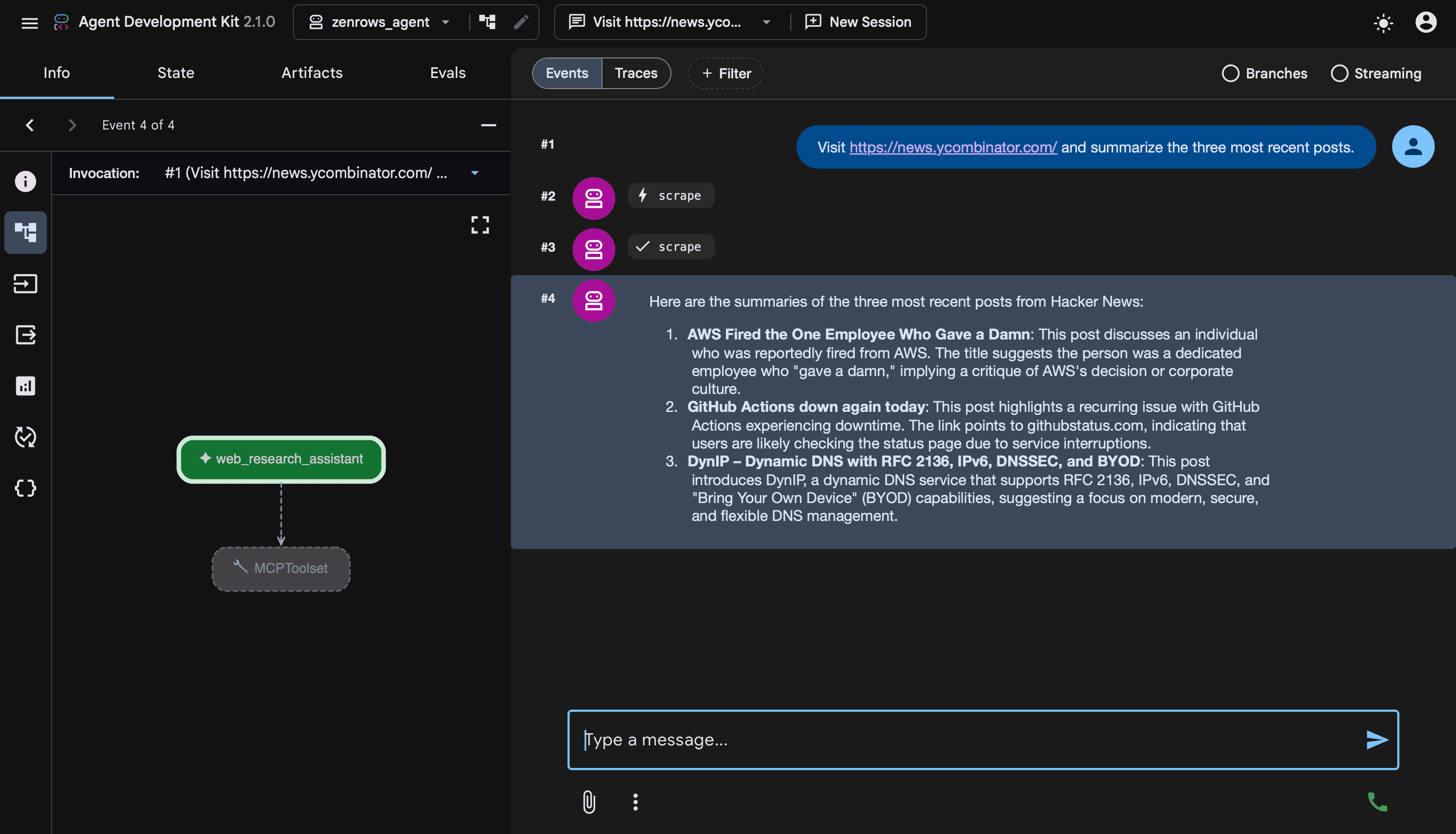 Open the URL printed in your terminal, select `zenrows_agent` from the agent dropdown, and try a prompt like:
```
Visit https://news.ycombinator.com/ and summarize the three most recent posts.
```
### How it works
* `MCPToolset` registers the ZenRows hosted MCP server as a tool source. `StreamableHTTPConnectionParams` points at the ZenRows MCP endpoint and carries your API key as an OAuth Bearer token in the `Authorization` header.
* On startup, `MCPToolset` queries the ZenRows server for its available tools and adapts each one to ADK's tool schema. The agent gets access to `scrape`, `browser_navigate`, `browser_click`, and 30+ other ZenRows tools with no extra configuration.
* `LlmAgent` equips the Gemini model with the toolset. The agent reads the prompt, picks the right tool, calls it through `MCPToolset`, gets the content back, and writes the answer.
**You've built a working web-aware agent in roughly 20 lines of code.** Let's look at more advanced patterns.
## Advanced usage
### Autonomous research agent
The real power of ADK is letting an agent decide for itself which tools to call across multiple steps. With ZenRows MCP, that means the agent can autonomously read several pages, follow links it finds interesting, and synthesize findings, all from a single prompt.
The example below builds a research agent that visits a topic landing page, identifies the most relevant linked articles, scrapes each one, and produces a synthesized report. This version uses ADK's programmatic `Runner` instead of `adk web`, which is the pattern to use in production code or when embedding ADK into your own application.
```python Python expandable theme={null}
import asyncio
import os
from google.adk.agents import LlmAgent
from google.adk.runners import Runner
from google.adk.sessions import InMemorySessionService
from google.adk.tools.mcp_tool import MCPToolset, StreamableHTTPConnectionParams
from google.genai.types import Content, Part
ZENROWS_API_KEY = os.environ["ZENROWS_API_KEY"]
research_agent = LlmAgent(
model="gemini-2.5-pro",
name="research_agent",
instruction=(
"You are a thorough web researcher. When given a topic and a starting URL, "
"visit the URL, identify the 3 most relevant linked articles, scrape each one, "
"and produce a synthesized report covering key findings, common themes, and "
"any contradictions. Cite each source with its URL."
),
tools=[
MCPToolset(
connection_params=StreamableHTTPConnectionParams(
url="https://mcp.zenrows.com/mcp",
headers={
"Authorization": f"Bearer {ZENROWS_API_KEY}",
},
)
)
],
)
async def main() -> None:
session_service = InMemorySessionService()
runner = Runner(
agent=research_agent,
app_name="zenrows_research_app",
session_service=session_service,
)
session = await session_service.create_session(
app_name="zenrows_research_app",
user_id="user_1",
)
prompt = (
"Research recent developments in AI tools. "
"Start at https://huggingface.co/blog and follow the most relevant links."
)
message = Content(role="user", parts=[Part(text=prompt)])
async for event in runner.run_async(
user_id=session.user_id,
session_id=session.id,
new_message=message,
):
if event.content and event.content.parts:
for part in event.content.parts:
if part.text:
print(part.text)
asyncio.run(main())
```
* Don't write an orchestration loop in your code. The agent decides on its own when to scrape, which URLs to follow, and when it has enough information to write the report. ADK runs the multi-step loop automatically.
* `gemini-2.5-pro` for multi-step tasks. Reasoning-capable Gemini models work better for autonomous workflows because they can plan their next action based on what they have learned so far. For lighter tasks, `gemini-2.5-flash` is faster and cheaper.
* Same MCP config as the basic example. The only things that changed are the agent's instructions, the model, and that you're driving the agent programmatically through `Runner` instead of `adk web`.
### Multi-agent workflows
Because ZenRows MCP is a standard ADK tool, you can share it across multiple agents and combine it with ADK's multi-agent patterns. A common setup is one agent for research (with ZenRows access) and another for writing (without web tools).
```python Python expandable theme={null}
import os
from google.adk.agents import LlmAgent
from google.adk.tools.mcp_tool import MCPToolset, StreamableHTTPConnectionParams
ZENROWS_API_KEY = os.environ["ZENROWS_API_KEY"]
zenrows_toolset = MCPToolset(
connection_params=StreamableHTTPConnectionParams(
url="https://mcp.zenrows.com/mcp",
headers={
"Authorization": f"Bearer {ZENROWS_API_KEY}",
},
)
)
writer_agent = LlmAgent(
model="gemini-2.5-flash",
name="writer_agent",
instruction="Take research findings and produce a polished article.",
)
researcher_agent = LlmAgent(
model="gemini-2.5-pro",
name="researcher_agent",
instruction=(
"Gather research from the web on the user's topic using ZenRows tools. "
"Once you have enough material, transfer to the writer_agent for the final draft."
),
tools=[zenrows_toolset],
sub_agents=[writer_agent],
)
```
The researcher agent calls ZenRows tools to gather material, then transfers control to the writer agent (which has no web access) for the final draft. ADK also supports sequential, parallel, loop, and graph-based workflow patterns. See the ADK multi-agent workflows documentation for the full set of patterns.
## Troubleshooting
* **`424 Failed Dependency` or `401 Unauthorized` from the MCP server**
1. Confirm the `Authorization: Bearer YOUR_ZENROWS_API_KEY` header is present in the `headers` dict on `StreamableHTTPConnectionParams`.
2. Verify your key in the ZenRows dashboard and confirm your subscription has remaining quota.
3. Confirm the URL is exactly `https://mcp.zenrows.com/mcp`.
* **Empty tool list when starting the agent**
If `adk web` shows the agent but no ZenRows tools appear in tool calls, the connection to the MCP server failed silently.
1. Check your API key, the URL, and your network connectivity.
2. Look at the `adk web` console output. `MCPToolset` logs `list_tools` errors there.
* **Agent repeatedly scrapes the same page**
Add explicit guidance in the agent's `instruction` about what to do once it has the data. For example, `"After scraping each URL once, summarize and stop."`
For complex flows, consider splitting the work across multiple agents using sub-agents.
* **Deployment fails with Agent Definition Must Be Synchronous**
ADK requires agents that use MCP tools to be defined at module load time. If you have an `async def get_agent()` factory, refactor so `root_agent` is a module-level variable instantiated synchronously.
See the ADK MCP deployment guide for the full pattern.
* **Page blocked or data missing in scraped content**
If the agent connects and invokes tools correctly but the scraped content comes back blocked or incomplete, the issue is on the target page rather than the MCP connection.
Add explicit guidance to your agent's instruction. For example, `"When scraping, ask ZenRows to use JavaScript rendering and Premium Proxies for protected sites."`
See the Universal Scraper API troubleshooting guide for parameter-level fixes.
## FAQ (Frequently Asked Questions)
Calling the Universal Scraper API directly works for any Python script. With ADK + ZenRows MCP, you get autonomous agent behavior on top: ADK decides which tool to call, chains multiple calls in a single run, handles multi-step workflows, and integrates with ADK's session, memory, and deployment infrastructure.
Use direct API calls for simple deterministic scripts. Use ADK + MCP when you want agent autonomy.
For simple agents, `gemini-2.5-flash` is fast and cost-effective. For autonomous multi-step research and complex reasoning, `gemini-2.5-pro` is a better fit. You can also use Claude, GPT, or any LiteLLM-supported model through ADK's model routing if you want to mix providers within the same workflow.
Yes. The `MCPToolset` class exists across all ADK language bindings, and the underlying transport (Streamable HTTP) is language-agnostic. Provide the URL `https://mcp.zenrows.com/mcp`, set the `Authorization: Bearer YOUR_ZENROWS_API_KEY` header, and the toolset discovers ZenRows' tools automatically. See the ADK MCP tools guide for language-specific syntax.
Yes. Use `StdioConnectionParams` with the `@zenrows/mcp` npm package instead of `StreamableHTTPConnectionParams`. The remote URL is recommended because it requires no local install, no Node.js dependency, and runs the same way in development and production. See the ZenRows MCP overview for the local stdio configuration.
Yes. Build the `MCPToolset` once and pass it to as many agents as you need.
```python theme={null}
zenrows_toolset = MCPToolset(connection_params=...)
agent_a = LlmAgent(name="A", tools=[zenrows_toolset])
agent_b = LlmAgent(name="B", tools=[zenrows_toolset])
```
Each agent gets independent tool calls. ZenRows handles them all on the same hosted server.
Yes. ADK's tracing captures every MCP `list_tools` and `call_tool` invocation alongside the rest of the agent's events. You can view them in OpenTelemetry-compatible backends or in Vertex AI Agent Engine's built-in observability when deployed there.
Open the URL printed in your terminal, select `zenrows_agent` from the agent dropdown, and try a prompt like:
```
Visit https://news.ycombinator.com/ and summarize the three most recent posts.
```
### How it works
* `MCPToolset` registers the ZenRows hosted MCP server as a tool source. `StreamableHTTPConnectionParams` points at the ZenRows MCP endpoint and carries your API key as an OAuth Bearer token in the `Authorization` header.
* On startup, `MCPToolset` queries the ZenRows server for its available tools and adapts each one to ADK's tool schema. The agent gets access to `scrape`, `browser_navigate`, `browser_click`, and 30+ other ZenRows tools with no extra configuration.
* `LlmAgent` equips the Gemini model with the toolset. The agent reads the prompt, picks the right tool, calls it through `MCPToolset`, gets the content back, and writes the answer.
**You've built a working web-aware agent in roughly 20 lines of code.** Let's look at more advanced patterns.
## Advanced usage
### Autonomous research agent
The real power of ADK is letting an agent decide for itself which tools to call across multiple steps. With ZenRows MCP, that means the agent can autonomously read several pages, follow links it finds interesting, and synthesize findings, all from a single prompt.
The example below builds a research agent that visits a topic landing page, identifies the most relevant linked articles, scrapes each one, and produces a synthesized report. This version uses ADK's programmatic `Runner` instead of `adk web`, which is the pattern to use in production code or when embedding ADK into your own application.
```python Python expandable theme={null}
import asyncio
import os
from google.adk.agents import LlmAgent
from google.adk.runners import Runner
from google.adk.sessions import InMemorySessionService
from google.adk.tools.mcp_tool import MCPToolset, StreamableHTTPConnectionParams
from google.genai.types import Content, Part
ZENROWS_API_KEY = os.environ["ZENROWS_API_KEY"]
research_agent = LlmAgent(
model="gemini-2.5-pro",
name="research_agent",
instruction=(
"You are a thorough web researcher. When given a topic and a starting URL, "
"visit the URL, identify the 3 most relevant linked articles, scrape each one, "
"and produce a synthesized report covering key findings, common themes, and "
"any contradictions. Cite each source with its URL."
),
tools=[
MCPToolset(
connection_params=StreamableHTTPConnectionParams(
url="https://mcp.zenrows.com/mcp",
headers={
"Authorization": f"Bearer {ZENROWS_API_KEY}",
},
)
)
],
)
async def main() -> None:
session_service = InMemorySessionService()
runner = Runner(
agent=research_agent,
app_name="zenrows_research_app",
session_service=session_service,
)
session = await session_service.create_session(
app_name="zenrows_research_app",
user_id="user_1",
)
prompt = (
"Research recent developments in AI tools. "
"Start at https://huggingface.co/blog and follow the most relevant links."
)
message = Content(role="user", parts=[Part(text=prompt)])
async for event in runner.run_async(
user_id=session.user_id,
session_id=session.id,
new_message=message,
):
if event.content and event.content.parts:
for part in event.content.parts:
if part.text:
print(part.text)
asyncio.run(main())
```
* Don't write an orchestration loop in your code. The agent decides on its own when to scrape, which URLs to follow, and when it has enough information to write the report. ADK runs the multi-step loop automatically.
* `gemini-2.5-pro` for multi-step tasks. Reasoning-capable Gemini models work better for autonomous workflows because they can plan their next action based on what they have learned so far. For lighter tasks, `gemini-2.5-flash` is faster and cheaper.
* Same MCP config as the basic example. The only things that changed are the agent's instructions, the model, and that you're driving the agent programmatically through `Runner` instead of `adk web`.
### Multi-agent workflows
Because ZenRows MCP is a standard ADK tool, you can share it across multiple agents and combine it with ADK's multi-agent patterns. A common setup is one agent for research (with ZenRows access) and another for writing (without web tools).
```python Python expandable theme={null}
import os
from google.adk.agents import LlmAgent
from google.adk.tools.mcp_tool import MCPToolset, StreamableHTTPConnectionParams
ZENROWS_API_KEY = os.environ["ZENROWS_API_KEY"]
zenrows_toolset = MCPToolset(
connection_params=StreamableHTTPConnectionParams(
url="https://mcp.zenrows.com/mcp",
headers={
"Authorization": f"Bearer {ZENROWS_API_KEY}",
},
)
)
writer_agent = LlmAgent(
model="gemini-2.5-flash",
name="writer_agent",
instruction="Take research findings and produce a polished article.",
)
researcher_agent = LlmAgent(
model="gemini-2.5-pro",
name="researcher_agent",
instruction=(
"Gather research from the web on the user's topic using ZenRows tools. "
"Once you have enough material, transfer to the writer_agent for the final draft."
),
tools=[zenrows_toolset],
sub_agents=[writer_agent],
)
```
The researcher agent calls ZenRows tools to gather material, then transfers control to the writer agent (which has no web access) for the final draft. ADK also supports sequential, parallel, loop, and graph-based workflow patterns. See the ADK multi-agent workflows documentation for the full set of patterns.
## Troubleshooting
* **`424 Failed Dependency` or `401 Unauthorized` from the MCP server**
1. Confirm the `Authorization: Bearer YOUR_ZENROWS_API_KEY` header is present in the `headers` dict on `StreamableHTTPConnectionParams`.
2. Verify your key in the ZenRows dashboard and confirm your subscription has remaining quota.
3. Confirm the URL is exactly `https://mcp.zenrows.com/mcp`.
* **Empty tool list when starting the agent**
If `adk web` shows the agent but no ZenRows tools appear in tool calls, the connection to the MCP server failed silently.
1. Check your API key, the URL, and your network connectivity.
2. Look at the `adk web` console output. `MCPToolset` logs `list_tools` errors there.
* **Agent repeatedly scrapes the same page**
Add explicit guidance in the agent's `instruction` about what to do once it has the data. For example, `"After scraping each URL once, summarize and stop."`
For complex flows, consider splitting the work across multiple agents using sub-agents.
* **Deployment fails with Agent Definition Must Be Synchronous**
ADK requires agents that use MCP tools to be defined at module load time. If you have an `async def get_agent()` factory, refactor so `root_agent` is a module-level variable instantiated synchronously.
See the ADK MCP deployment guide for the full pattern.
* **Page blocked or data missing in scraped content**
If the agent connects and invokes tools correctly but the scraped content comes back blocked or incomplete, the issue is on the target page rather than the MCP connection.
Add explicit guidance to your agent's instruction. For example, `"When scraping, ask ZenRows to use JavaScript rendering and Premium Proxies for protected sites."`
See the Universal Scraper API troubleshooting guide for parameter-level fixes.
## FAQ (Frequently Asked Questions)
Calling the Universal Scraper API directly works for any Python script. With ADK + ZenRows MCP, you get autonomous agent behavior on top: ADK decides which tool to call, chains multiple calls in a single run, handles multi-step workflows, and integrates with ADK's session, memory, and deployment infrastructure.
Use direct API calls for simple deterministic scripts. Use ADK + MCP when you want agent autonomy.
For simple agents, `gemini-2.5-flash` is fast and cost-effective. For autonomous multi-step research and complex reasoning, `gemini-2.5-pro` is a better fit. You can also use Claude, GPT, or any LiteLLM-supported model through ADK's model routing if you want to mix providers within the same workflow.
Yes. The `MCPToolset` class exists across all ADK language bindings, and the underlying transport (Streamable HTTP) is language-agnostic. Provide the URL `https://mcp.zenrows.com/mcp`, set the `Authorization: Bearer YOUR_ZENROWS_API_KEY` header, and the toolset discovers ZenRows' tools automatically. See the ADK MCP tools guide for language-specific syntax.
Yes. Use `StdioConnectionParams` with the `@zenrows/mcp` npm package instead of `StreamableHTTPConnectionParams`. The remote URL is recommended because it requires no local install, no Node.js dependency, and runs the same way in development and production. See the ZenRows MCP overview for the local stdio configuration.
Yes. Build the `MCPToolset` once and pass it to as many agents as you need.
```python theme={null}
zenrows_toolset = MCPToolset(connection_params=...)
agent_a = LlmAgent(name="A", tools=[zenrows_toolset])
agent_b = LlmAgent(name="B", tools=[zenrows_toolset])
```
Each agent gets independent tool calls. ZenRows handles them all on the same hosted server.
Yes. ADK's tracing captures every MCP `list_tools` and `call_tool` invocation alongside the rest of the agent's events. You can view them in OpenTelemetry-compatible backends or in Vertex AI Agent Engine's built-in observability when deployed there.