> ## Documentation Index
> Fetch the complete documentation index at: https://docs.zenrows.com/llms.txt
> Use this file to discover all available pages before exploring further.
# How to Integrate Playwright with ZenRows
> Set up Playwright with ZenRows residential proxies and Scraping Browser to bypass anti-bot detection and scrape JavaScript-rendered web pages.
Playwright is a powerful headless browser that can be integrated with ZenRows to avoid blocks and ensure smooth and reliable data extraction.
In Python, Playwright supports two variations: synchronous (great for small-scale scraping where concurrency isn't an issue) and asynchronous (recommended for projects where concurrency, scalability, and performance are essential factors)
This tutorial focuses on the Playwright asynchronous API. So, we need to import the `async_playwright` and `asyncio` modules.
## Use ZenRows' Proxies with Playwright to Avoid Blocks
ZenRows offers residential proxies in 190+ countries that auto-rotate the IP address for you and offer Geolocation and http/https protocols. Integrate them into Playwright to appear as a different user every time so that your chances of getting blocked are reduced exponentially.
You have three ways to get a proxy with ZenRows, one is via [Residential Proxies](/residential-proxies/introduction), where you get our proxy, and it's charged by the bandwidth; the other way is via the Universal Scraper API's Premium Proxy, which is our residential proxy for the API, and you are charged by the request, depending on the params you choose; and the third is by using the [Scraping Browser](/scraping-browser/get-started/playwright) where you can integrate into your code with just one line of code.
For this tutorial, we'll focus on the Residential Proxies, the recommended ZenRows proxy for Playwright. In case you already have a running Playwright code, consider testing our [Scraping Browser](/scraping-browser/get-started/playwright).
After logging in, you'll get redirected to the Request Playground page, then go to the [Proxies Generator](https://app.zenrows.com/proxies/generator) page and create your proxy:
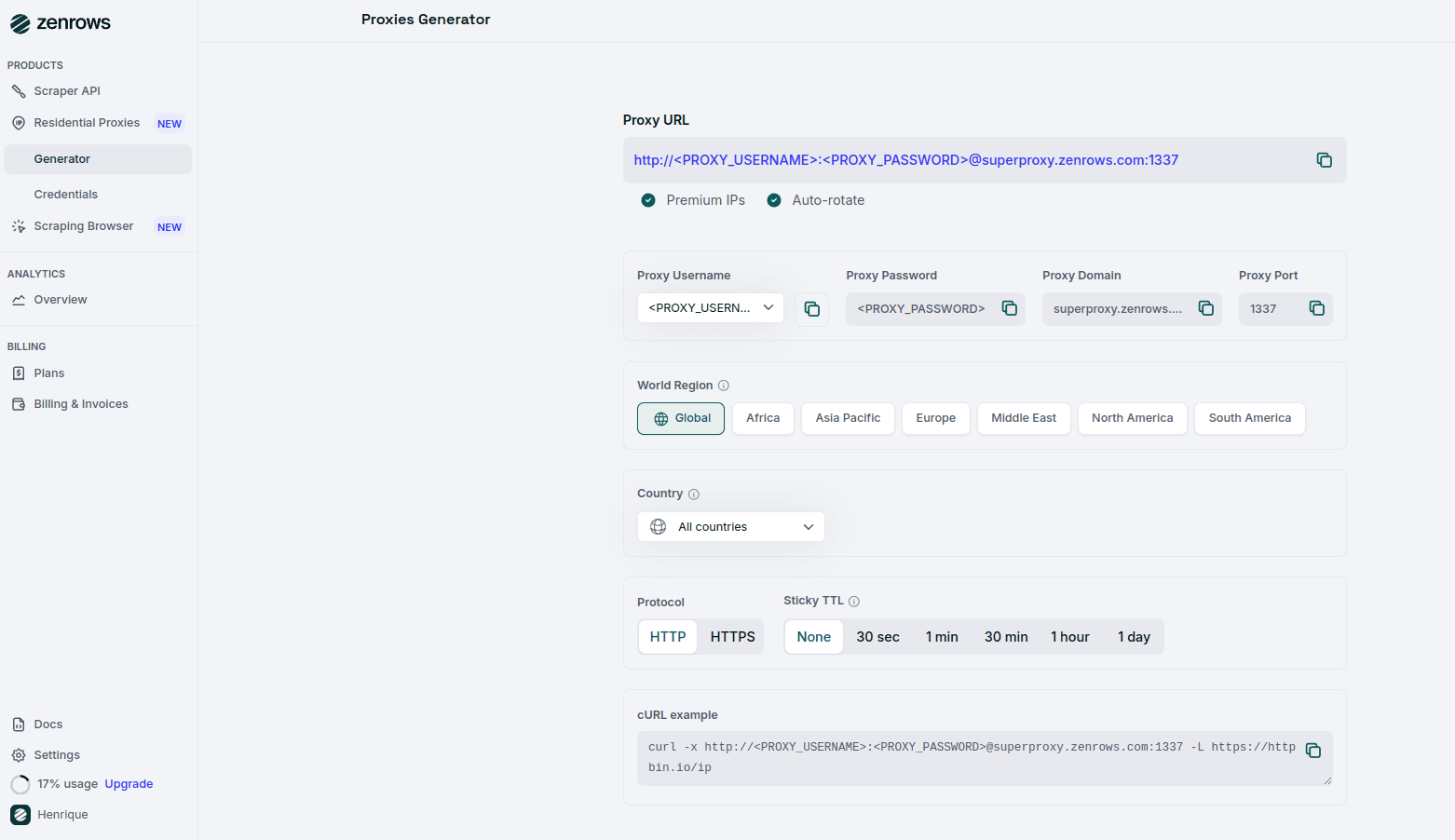 Select your Proxy Username, Proxy Country, Protocol, and Sticky TTL. Finally, copy your Proxy URL or use the cURL example at the bottom of the page.
```bash theme={null}
http://:@superproxy.zenrows.com:1337
```
The target site of this tutorial section will be httpbin.io/ip, an endpoint that returns the origin IP of the incoming request. You'll use it to verify that ZenRows is working.
Let's assume you have set the Playwright environment with the initial script below in *Python*.
```python scraper.py theme={null}
import asyncio
from playwright.async_api import async_playwright
async def main():
async with async_playwright() as p:
browser = await p.chromium.launch(headless=True)
page = await browser.new_page()
await page.goto("https://httpbin.io/ip")
# Get the page content
content = await page.content()
print(content)
await browser.close()
# Run the asynchronous main function
asyncio.run(main())
```
## Configure your Residential Proxy in Playwright
Make sure you have Playwright installed and in your `scraper.py` file and add the following code:
```python scraper.py theme={null}
import asyncio
from playwright.async_api import async_playwright
async def main():
proxy = {
"server": "http://superproxy.zenrows.com:1337",
"username": "", # Replace with your ZenRows proxy username
"password": "" # Replace with your ZenRows proxy password
}
async with async_playwright() as p:
# Configure the browser to use the proxy
browser = await p.chromium.launch(proxy=proxy, headless=True)
page = await browser.new_page()
await page.goto("https://httpbin.io/ip")
# Get the page content
content = await page.content()
print(content)
await browser.close()
asyncio.run(main())
```
Awesome! You just integrated ZenRows' Residential Proxies into Playwright. 🚀
## Pricing
ZenRows operates on a pay-per-success model on the Universal Scraper API (that means you only pay for requests that produce the desired result); on the Residential Proxies, it's based on bandwidth use.
To optimize your scraper's success rate, fully replace Playwright with ZenRows. Different pages on the same site may have various levels of protection, but using the parameters recommended above will ensure that you are covered.
ZenRows offers a range of plans, starting at just \$69 monthly. For more detailed information, please refer to our [pricing page](https://www.zenrows.com/pricing).
## Frequently Asked Questions (FAQs)
Playwright is widely recognized by websites' anti-bot systems, which can block your requests. Using residential proxies from ZenRows allows you to rotate IP addresses and appear as a legitimate user, helping to bypass these restrictions and reduce the chances of being blocked.
You can test the proxy connection by running the script provided in the tutorial and checking the output from `httpbin.io/ip`. If the proxy is working, the response will display a different IP address than your local machine's.
Many websites employ advanced anti-bot measures, such as CAPTCHAs and Web Application Firewalls (WAFs), to prevent automated scraping. Simply using proxies may not be enough to bypass these protections.
Instead of relying solely on proxies, consider using [ZenRows' Universal Scraper API](https://app.zenrows.com/builder), which provides:
* **JavaScript Rendering and Interaction Simulation:** Optimized with anti-bot bypass capabilities.
* **Comprehensive Anti-Bot Toolkit:** ZenRows offers advanced tools to overcome complex anti-scraping solutions.
Select your Proxy Username, Proxy Country, Protocol, and Sticky TTL. Finally, copy your Proxy URL or use the cURL example at the bottom of the page.
```bash theme={null}
http://:@superproxy.zenrows.com:1337
```
The target site of this tutorial section will be httpbin.io/ip, an endpoint that returns the origin IP of the incoming request. You'll use it to verify that ZenRows is working.
Let's assume you have set the Playwright environment with the initial script below in *Python*.
```python scraper.py theme={null}
import asyncio
from playwright.async_api import async_playwright
async def main():
async with async_playwright() as p:
browser = await p.chromium.launch(headless=True)
page = await browser.new_page()
await page.goto("https://httpbin.io/ip")
# Get the page content
content = await page.content()
print(content)
await browser.close()
# Run the asynchronous main function
asyncio.run(main())
```
## Configure your Residential Proxy in Playwright
Make sure you have Playwright installed and in your `scraper.py` file and add the following code:
```python scraper.py theme={null}
import asyncio
from playwright.async_api import async_playwright
async def main():
proxy = {
"server": "http://superproxy.zenrows.com:1337",
"username": "", # Replace with your ZenRows proxy username
"password": "" # Replace with your ZenRows proxy password
}
async with async_playwright() as p:
# Configure the browser to use the proxy
browser = await p.chromium.launch(proxy=proxy, headless=True)
page = await browser.new_page()
await page.goto("https://httpbin.io/ip")
# Get the page content
content = await page.content()
print(content)
await browser.close()
asyncio.run(main())
```
Awesome! You just integrated ZenRows' Residential Proxies into Playwright. 🚀
## Pricing
ZenRows operates on a pay-per-success model on the Universal Scraper API (that means you only pay for requests that produce the desired result); on the Residential Proxies, it's based on bandwidth use.
To optimize your scraper's success rate, fully replace Playwright with ZenRows. Different pages on the same site may have various levels of protection, but using the parameters recommended above will ensure that you are covered.
ZenRows offers a range of plans, starting at just \$69 monthly. For more detailed information, please refer to our [pricing page](https://www.zenrows.com/pricing).
## Frequently Asked Questions (FAQs)
Playwright is widely recognized by websites' anti-bot systems, which can block your requests. Using residential proxies from ZenRows allows you to rotate IP addresses and appear as a legitimate user, helping to bypass these restrictions and reduce the chances of being blocked.
You can test the proxy connection by running the script provided in the tutorial and checking the output from `httpbin.io/ip`. If the proxy is working, the response will display a different IP address than your local machine's.
Many websites employ advanced anti-bot measures, such as CAPTCHAs and Web Application Firewalls (WAFs), to prevent automated scraping. Simply using proxies may not be enough to bypass these protections.
Instead of relying solely on proxies, consider using [ZenRows' Universal Scraper API](https://app.zenrows.com/builder), which provides:
* **JavaScript Rendering and Interaction Simulation:** Optimized with anti-bot bypass capabilities.
* **Comprehensive Anti-Bot Toolkit:** ZenRows offers advanced tools to overcome complex anti-scraping solutions.