> ## Documentation Index
> Fetch the complete documentation index at: https://docs.zenrows.com/llms.txt
> Use this file to discover all available pages before exploring further.
# Selenium Integration with ZenRows
> Configure ZenRows residential proxies with Selenium WebDriver to bypass anti-bot detection and IP blocks in automated browser scraping tasks.
Selenium is one of the most popular headless browser automation libraries. However, its widespread use has made it a prime target for anti-scraping technologies, which can identify and block its requests.
To avoid this, you can integrate your Selenium setup with premium proxies, which will help you bypass these blocks and maintain successful web scraping.
The code snippets below are in Python, but the instructions apply to any programming language. Additionally, this tutorial is relevant to all tools that utilize Selenium as a base, such as Selenium Wire, Selenium Stealth, and Undetected ChromeDriver.
## Integrate Selenium with ZenRows' Proxies to Avoid Getting Blocked
ZenRows offers residential proxies in 190+ countries that auto-rotate the IP address for you and offer Geolocation and http/https protocols. Integrate them into Selenium to appear as a different user every time so that your chances of getting blocked are reduced exponentially.
You have two ways to get a proxy with ZenRows, one is via [Residential Proxies](/residential-proxies/introduction), where you get our proxy, and it's charged by the bandwidth; the other way is via the Universal Scraper API's Premium Proxy, which is our residential proxy for the API, and you are charged by the request, depending on the params you choose.
For this tutorial, we'll focus on the Residential Proxies, the recommended ZenRows proxy for Selenium
After logging in, you'll get redirected to the Request Playground page, then go to the [Proxies Generator](https://app.zenrows.com/proxies/generator) page and create your proxy:
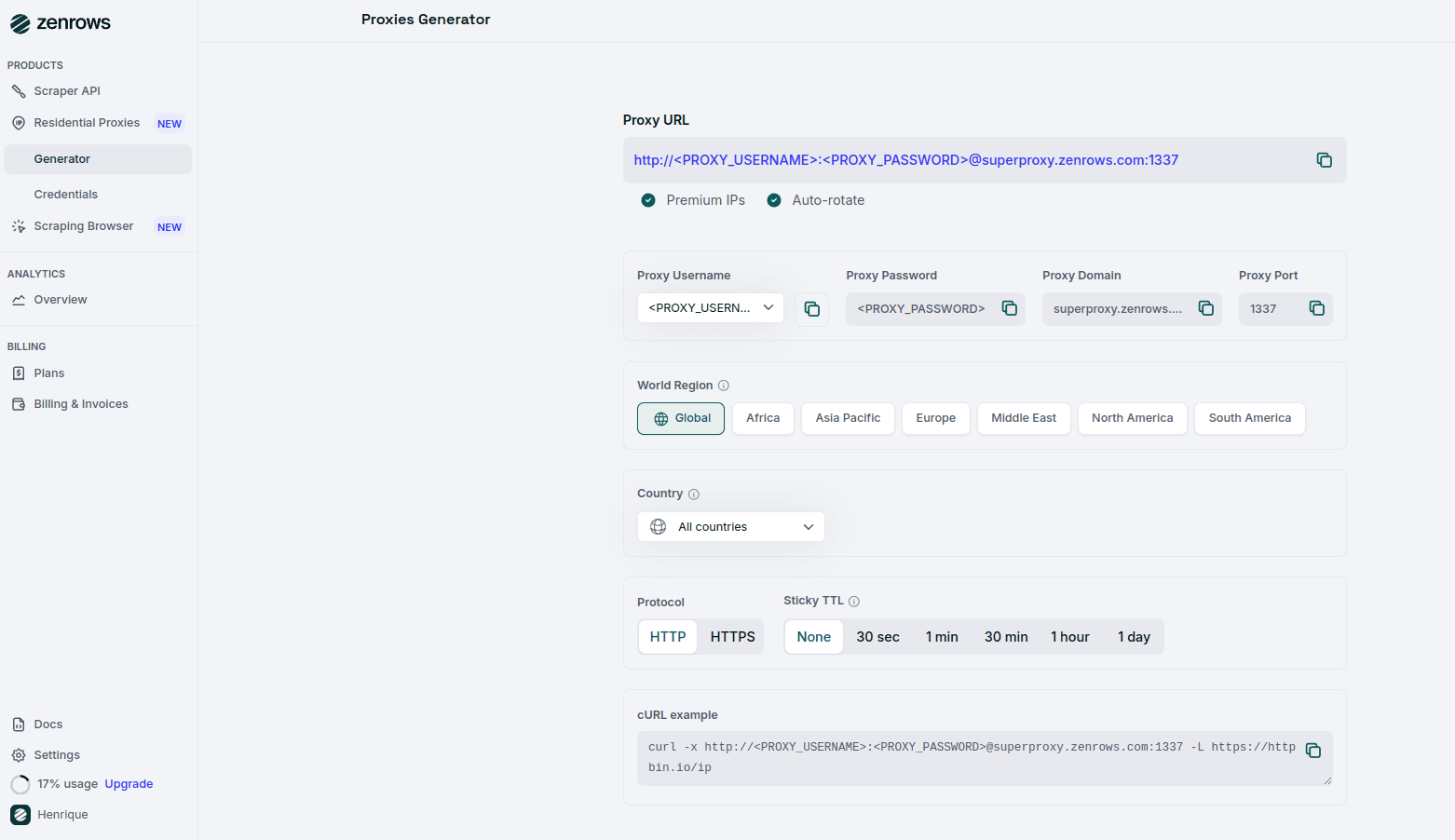 Select your Proxy Username, Proxy Country, Protocol, and Sticky TTL. Finally, copy your Proxy URL or use the cURL example at the bottom of the page.
```bash theme={null}
http://:@superproxy.zenrows.com:1337
```
The target site of this tutorial section will be httpbin.io/ip, an endpoint that returns the origin IP of the incoming request. You'll use it to verify that ZenRows is working.
Consider you have the following Python script using Selenium:
```python scraper.py theme={null}
# installed selenium 4.11+
from selenium import webdriver
from selenium.webdriver.chrome.service import Service
from selenium.webdriver.common.by import By
# initialize a controllable Chrome instance
# in headless mode
service = Service()
options = webdriver.ChromeOptions()
options.add_argument("--headless=new")
driver = webdriver.Chrome(service=service, options=options)
# visit the target site in the browser
driver.get("https://httpbin.io/ip")
# get the page content and print it
response = driver.find_element(By.TAG_NAME, "body").text
print(response)
driver.quit()
```
## Configure your Residential Proxy in Selenium
To use an authenticated proxy in Selenium, you can utilize the selenium-wire library, as Chrome does not natively support authenticated proxies.
Selenium Wire extends Selenium's functionality, allowing you to easily configure and use proxies in your scraping projects.
First, install Selenium Wire:
```bash theme={null}
pip install selenium-wire
```
With Selenium Wire installed, you can configure the proxy at the browser level in Selenium. Below is an example configuration where you should replace `` and `` with the actual credentials.
```python scraper.py theme={null}
from seleniumwire import webdriver
from selenium.webdriver.chrome.service import Service
from selenium.webdriver.common.by import By
# Initialize a controllable Chrome instance in headless mode
service = Service()
options = webdriver.ChromeOptions()
options.add_argument("--headless=new")
# Configure the residential proxy
proxy_url = "http://:@superproxy.zenrows.com:1337"
seleniumwire_options = {
"proxy": {
"http": f"{proxy_url}",
"https": f"{proxy_url}",
},
}
# Initialize the Chrome driver with the proxy settings
driver = webdriver.Chrome(
service=service,
seleniumwire_options=seleniumwire_options,
options=options
)
# Visit the target site through the proxy and retrieve the IP address
driver.get("https://httpbin.io/ip")
# Get the page content and print it to verify the IP rotation
response = driver.find_element(By.TAG_NAME, "body").text
print(response)
driver.quit()
```
Execute your script using Python:
```bash theme={null}
python scraper.py
```
Congrats! You just saw how ZenRows enables you to overcome the limitations of Selenium. 🥳
## Troubleshooting
### Chromedriver Version Incompatibility or Chrome Not Found Error
If you encounter an error like `chromedriver version detected in PATH might not be compatible with the detected Chrome version` or `session not created from unknown error: no chrome binary at /usr/bin/google-chrome`, this indicates that the version of Chromedriver in your system's PATH is incompatible with the installed version of Chrome. Additionally, this error may also occur if the Chrome binary is not found at the expected location.
To resolve this issue, explicitly specify the path to the Chrome executable in your Selenium configuration. You can do this by setting the `executable_path` option to the correct path where Chrome is installed on your system.
```python scraper.py theme={null}
service = Service(executable_path="/your/path/to/chrome-or-chromium")
options = webdriver.ChromeOptions()
options.add_argument("--headless=new")
```
### Invalid SSL Certificate
You might encounter an `ERR_CERT_AUTHORITY_INVALID` error due to SSL certificate issues. These errors can prevent your scraper from accessing the content you need.
Instruct Chrome to ignore SSL/certificate errors by setting the `accept_insecure_certs` option to `True`.
```python scraper.py theme={null}
options = webdriver.ChromeOptions()
options.accept_insecure_certs = True
```
This setting allows Selenium to access the page's content without being blocked by SSL certificate errors.
### Stopped by Bot Detection with Selenium: CAPTCHAs, WAFs, and Beyond
Many websites employ advanced anti-bot measures like CAPTCHAs and Web Application Firewalls (WAFs) to prevent automated scraping. Simply using proxies may not be enough to bypass these protections.
Instead of relying solely on Selenium, consider using [ZenRows' Universal Scraper API](https://app.zenrows.com/builder), which provides:
* **JavaScript Rendering and Interaction Simulation:** Similar to Selenium but optimized with anti-bot bypass capabilities.
* **Comprehensive Anti-Bot Toolkit:** ZenRows offers advanced tools to overcome complex anti-scraping solutions.
## Pricing
ZenRows operates on a bandwidth usage model on the Residential Proxies; it is pay-per-success on the Universal Scraper API (that means you only pay for requests that produce the desired result).
To optimize your scraper's success rate, fully replace Selenium with ZenRows. Different pages on the same site may have various levels of protection, but using the parameters recommended above will ensure that you are covered.
ZenRows offers a range of plans, starting at just \$69 monthly. For more detailed information, please refer to our [pricing page](https://www.zenrows.com/pricing).
## Frequently Asked Questions (FAQs)
Selenium is widely recognized by websites' anti-bot systems, which can block your requests. Using residential proxies from ZenRows allows you to rotate IP addresses and appear as a legitimate user, helping to bypass these restrictions and reduce the chances of being blocked.
You can test the proxy connection by running the script provided in the tutorial and checking the output from `httpbin.io/ip`. If the proxy is working, the response will display a different IP address than your local machine's.
Many websites employ advanced anti-bot measures, such as CAPTCHAs and Web Application Firewalls (WAFs), to prevent automated scraping. Simply using proxies may not be enough to bypass these protections.
Instead of relying solely on proxies, consider using [ZenRows' Universal Scraper API](https://app.zenrows.com/builder), which provides:
* **JavaScript Rendering and Interaction Simulation:** Optimized with anti-bot bypass capabilities.
* **Comprehensive Anti-Bot Toolkit:** ZenRows offers advanced tools to overcome complex anti-scraping solutions.
Select your Proxy Username, Proxy Country, Protocol, and Sticky TTL. Finally, copy your Proxy URL or use the cURL example at the bottom of the page.
```bash theme={null}
http://:@superproxy.zenrows.com:1337
```
The target site of this tutorial section will be httpbin.io/ip, an endpoint that returns the origin IP of the incoming request. You'll use it to verify that ZenRows is working.
Consider you have the following Python script using Selenium:
```python scraper.py theme={null}
# installed selenium 4.11+
from selenium import webdriver
from selenium.webdriver.chrome.service import Service
from selenium.webdriver.common.by import By
# initialize a controllable Chrome instance
# in headless mode
service = Service()
options = webdriver.ChromeOptions()
options.add_argument("--headless=new")
driver = webdriver.Chrome(service=service, options=options)
# visit the target site in the browser
driver.get("https://httpbin.io/ip")
# get the page content and print it
response = driver.find_element(By.TAG_NAME, "body").text
print(response)
driver.quit()
```
## Configure your Residential Proxy in Selenium
To use an authenticated proxy in Selenium, you can utilize the selenium-wire library, as Chrome does not natively support authenticated proxies.
Selenium Wire extends Selenium's functionality, allowing you to easily configure and use proxies in your scraping projects.
First, install Selenium Wire:
```bash theme={null}
pip install selenium-wire
```
With Selenium Wire installed, you can configure the proxy at the browser level in Selenium. Below is an example configuration where you should replace `` and `` with the actual credentials.
```python scraper.py theme={null}
from seleniumwire import webdriver
from selenium.webdriver.chrome.service import Service
from selenium.webdriver.common.by import By
# Initialize a controllable Chrome instance in headless mode
service = Service()
options = webdriver.ChromeOptions()
options.add_argument("--headless=new")
# Configure the residential proxy
proxy_url = "http://:@superproxy.zenrows.com:1337"
seleniumwire_options = {
"proxy": {
"http": f"{proxy_url}",
"https": f"{proxy_url}",
},
}
# Initialize the Chrome driver with the proxy settings
driver = webdriver.Chrome(
service=service,
seleniumwire_options=seleniumwire_options,
options=options
)
# Visit the target site through the proxy and retrieve the IP address
driver.get("https://httpbin.io/ip")
# Get the page content and print it to verify the IP rotation
response = driver.find_element(By.TAG_NAME, "body").text
print(response)
driver.quit()
```
Execute your script using Python:
```bash theme={null}
python scraper.py
```
Congrats! You just saw how ZenRows enables you to overcome the limitations of Selenium. 🥳
## Troubleshooting
### Chromedriver Version Incompatibility or Chrome Not Found Error
If you encounter an error like `chromedriver version detected in PATH might not be compatible with the detected Chrome version` or `session not created from unknown error: no chrome binary at /usr/bin/google-chrome`, this indicates that the version of Chromedriver in your system's PATH is incompatible with the installed version of Chrome. Additionally, this error may also occur if the Chrome binary is not found at the expected location.
To resolve this issue, explicitly specify the path to the Chrome executable in your Selenium configuration. You can do this by setting the `executable_path` option to the correct path where Chrome is installed on your system.
```python scraper.py theme={null}
service = Service(executable_path="/your/path/to/chrome-or-chromium")
options = webdriver.ChromeOptions()
options.add_argument("--headless=new")
```
### Invalid SSL Certificate
You might encounter an `ERR_CERT_AUTHORITY_INVALID` error due to SSL certificate issues. These errors can prevent your scraper from accessing the content you need.
Instruct Chrome to ignore SSL/certificate errors by setting the `accept_insecure_certs` option to `True`.
```python scraper.py theme={null}
options = webdriver.ChromeOptions()
options.accept_insecure_certs = True
```
This setting allows Selenium to access the page's content without being blocked by SSL certificate errors.
### Stopped by Bot Detection with Selenium: CAPTCHAs, WAFs, and Beyond
Many websites employ advanced anti-bot measures like CAPTCHAs and Web Application Firewalls (WAFs) to prevent automated scraping. Simply using proxies may not be enough to bypass these protections.
Instead of relying solely on Selenium, consider using [ZenRows' Universal Scraper API](https://app.zenrows.com/builder), which provides:
* **JavaScript Rendering and Interaction Simulation:** Similar to Selenium but optimized with anti-bot bypass capabilities.
* **Comprehensive Anti-Bot Toolkit:** ZenRows offers advanced tools to overcome complex anti-scraping solutions.
## Pricing
ZenRows operates on a bandwidth usage model on the Residential Proxies; it is pay-per-success on the Universal Scraper API (that means you only pay for requests that produce the desired result).
To optimize your scraper's success rate, fully replace Selenium with ZenRows. Different pages on the same site may have various levels of protection, but using the parameters recommended above will ensure that you are covered.
ZenRows offers a range of plans, starting at just \$69 monthly. For more detailed information, please refer to our [pricing page](https://www.zenrows.com/pricing).
## Frequently Asked Questions (FAQs)
Selenium is widely recognized by websites' anti-bot systems, which can block your requests. Using residential proxies from ZenRows allows you to rotate IP addresses and appear as a legitimate user, helping to bypass these restrictions and reduce the chances of being blocked.
You can test the proxy connection by running the script provided in the tutorial and checking the output from `httpbin.io/ip`. If the proxy is working, the response will display a different IP address than your local machine's.
Many websites employ advanced anti-bot measures, such as CAPTCHAs and Web Application Firewalls (WAFs), to prevent automated scraping. Simply using proxies may not be enough to bypass these protections.
Instead of relying solely on proxies, consider using [ZenRows' Universal Scraper API](https://app.zenrows.com/builder), which provides:
* **JavaScript Rendering and Interaction Simulation:** Optimized with anti-bot bypass capabilities.
* **Comprehensive Anti-Bot Toolkit:** ZenRows offers advanced tools to overcome complex anti-scraping solutions.