> ## Documentation Index
> Fetch the complete documentation index at: https://docs.zenrows.com/llms.txt
> Use this file to discover all available pages before exploring further.
# Make Your First Request with ZenRows Residential Proxies
> Send your first request through ZenRows Residential Proxies, verify the proxy connection works, and explore code examples in any language.
Learn how to make your first web scraping request using ZenRows' Residential Proxies. This guide walks you through the basics, shows you how to verify your proxy setup, and introduces advanced proxy features, such as geo-targeting and sticky sessions.
ZenRows Residential Proxies enable you to access region-restricted content by routing requests through a pool of millions of real residential IP addresses. You can use them in any programming language that supports HTTP proxies.
## 1. Make a Request Without a Proxy
An initial request without a proxy uses your default IP address.
To confirm the IP address being used, we'll request `https://httpbin.io/ip`, a web page that returns your IP address.
```python Python theme={null}
# pip install requests
import requests
response = requests.get("https://httpbin.io/ip")
if response.status_code != 200:
print(f"An error occurred with {response.status_code}")
else:
print(response.text)
```
```javascript Node.js theme={null}
// npm install axios
const axios = require('axios');
axios.get('https://httpbin.io/ip')
.then((response) => {
if (response.status !== 200) {
console.log(`An error occurred with ${response.status}`);
} else {
console.log(response.data);
}
})
.catch((error) => {
console.log('An error occurred:', error.message);
});
```
You'll see your device's public IP address in the output. Next, let's use ZenRows Residential Proxies.
## 2. Integrate ZenRows Residential Proxies
Improve the previous request with the Residential Proxies by following these steps.
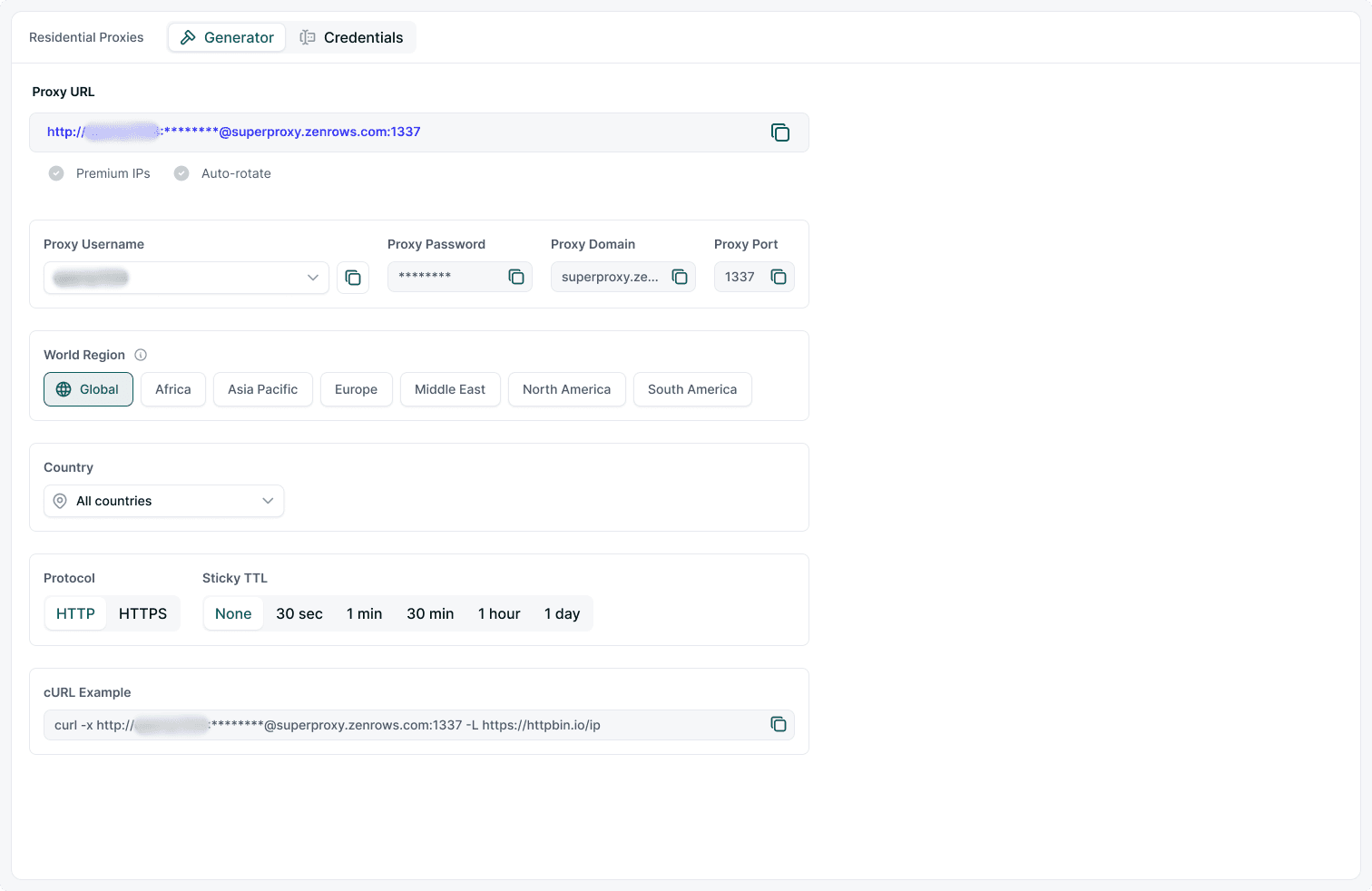
### Step 1: Get Your Proxy Credentials
1. Go to your [ZenRows Residential Proxies dashboard](https://app.zenrows.com/residential-proxies).
2. Copy your proxy username, password, proxy domain, and port.
 ### Step 2: Configure Your Proxy Settings
Prepare your proxy credentials and build the proxy URL for your HTTP client.
```python Python theme={null}
proxy_username = "PROXY_USERNAME"
proxy_password = "PROXY_PASSWORD"
proxy_domain = "superproxy.zenrows.com"
proxy_port = "1337"
proxy_url = f"http://{proxy_username}:{proxy_password}@{proxy_domain}:{proxy_port}"
proxies = {
"http": proxy_url,
"https": proxy_url,
}
```
```javascript Node.js theme={null}
const proxy = {
protocol: 'http',
host: 'superproxy.zenrows.com',
port: '1337',
auth: {
username: 'PROXY_USERNAME',
password: 'PROXY_PASSWORD',
},
};
```
### Step 3: Use the Residential Proxies for Scraping Requests
To use the Residential Proxies in your request, include the proxy dictionary as a request parameter:
```python Python theme={null}
# pip3 install requests
import requests
# ...
response = requests.get("https://httpbin.io/ip", proxies=proxies)
if response.status_code != 200:
print(f"An error occurred with {response.status_code}")
else:
print(response.text)
```
```javascript Node.js theme={null}
// npm install axios
const axios = require('axios');
// ...
// send a request with the proxies
axios
.get('https://httpbin.org/ip', {
proxy: proxy,
})
.then((res) => {
console.log(res.data);
})
.catch((err) => console.error(err));
```
**Put it all together**
Combine all the snippets, and you'll have the following complete code:
```python Python theme={null}
# pip3 install requests
import requests
# define your proxy credentials
proxy_username = "PROXY_USERNAME"
proxy_password = "PROXY_PASSWORD"
proxy_domain = "superproxy.zenrows.com"
proxy_port = "1337"
# build the proxy URL
proxy_url = f"http://{proxy_username}:{proxy_password}@{proxy_domain}:{proxy_port}"
# configure proxy protocols
proxies = {
"http": proxy_url,
"https": proxy_url,
}
response = requests.get("https://httpbin.io/ip", proxies=proxies)
if response.status_code != 200:
print(f"An error occurred with {response.status_code}")
else:
print(response.text)
```
```javascript Node.js theme={null}
// npm install axios
const axios = require('axios');
// define your proxy credentials
const proxy = {
protocol: 'http',
host: 'superproxy.zenrows.com',
port: '1337',
auth: {
username: 'PROXY_USERNAME',
password: 'PROXY_PASSWORD',
},
};
// send a request with the proxies
axios
.get('https://httpbin.org/ip', {
proxy: proxy,
})
.then((res) => {
console.log(res.data);
})
.catch((err) => console.error(err));
```
Run the code and you'll see a new IP address for each request, confirming your requests are routed through ZenRows Residential Proxies.
### Example Output
```json theme={null}
{
"origin": "71.172.140.38:44752"
}
```
## 3. Advanced Proxy Options
ZenRows Residential Proxies offer advanced features for more control:
### Geo-targeting
Route requests through IPs from a specific country or region. This is useful for:
* Comparing product prices across regions
* Job availability and salary comparison
* Housing and rent price variation
* Logistics and shipping cost analysis
* Testing website localization and compliance
* Demand analysis
* Ad verification
**How to set the proxy country:**
```python Python theme={null}
proxy_username = "PROXY_USERNAME"
proxy_password = "PROXY_PASSWORD_country-ca" # Canada
proxy_domain = "superproxy.zenrows.com"
proxy_port = "1337"
```
```javascript Node.js theme={null}
const proxy = {
protocol: 'http',
host: 'superproxy.zenrows.com',
port: '1337',
auth: {
username: 'PROXY_USERNAME',
password: 'PROXY_PASSWORD_country-ca',
},
};
```
Replace `country-ca` with the desired country code. See the [geo-location FAQ](/universal-scraper-api/features/proxy-country) for more details.
### Regional Rotation
Rotate proxies within a specific region (e.g., Europe):
```python Python theme={null}
proxy_password = "PROXY_PASSWORD_region-eu" # Europe
```
```javascript Node.js theme={null}
password: 'PROXY_PASSWORD_region-eu',
```
You can only set either a country or a region, not both.
### Sticky Sessions (TTL)
The sticky TTL (Time-to-Live) feature allows you to maintain a single proxy for a specified duration.
To add a stick TTL, go to your Residential Proxies dashboard and select a TTL option. The TTL option is added to the generated proxy URL:
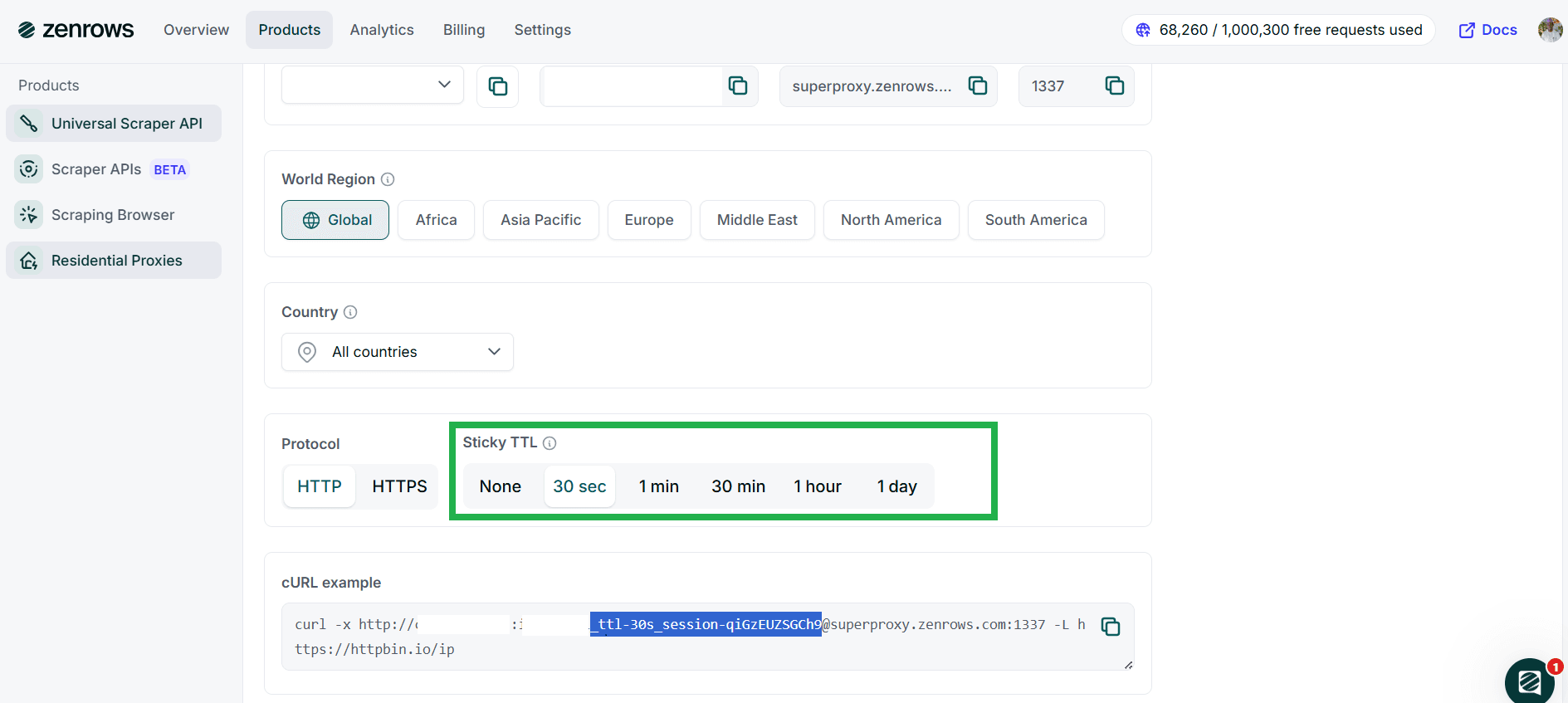
Include the generated TTL session in the password string:
```python Python theme={null}
proxy_password = "PROXY_PASSWORD_ttl-30s_session-qiGzEUZSGCh9"
```
```javascript Node.js theme={null}
password: 'PROXY_PASSWORD_ttl-30s_session-qiGzEUZSGCh9',
```
## Troubleshooting
* **Tunnel failed with response 407 (authentication error):**
* Ensure you enter the correct authentication credentials.
* Enter the correct proxy country or region code.
* **Access denied | 403 forbidden error:**
* Try another country or region.
* Reduce the session TTL to avoid using the same IP address for too long.
* Switch to the Universal Scraper API to increase the scraping success rate.
* **Could not resolve proxy:**
* Check and ensure you've used the correct proxy domain.
## Tips for Accessing Highly Protected Websites
* **Scrape during off-peak hours:** Scraping when the website is less busy can increase your success rate, as anti-bots may be less active. Off-peak hours vary per site but usually fall at night or in the mornings.
* **Use exponential backoffs and retries:** Adequate use of backoffs and retries helps simulate real user behavior and can reduce the chances of IP bans, especially for long TTL sessions.
* **Persist session with proxies to solve CAPTCHAs:** CAPTCHAs are tied to sessions. When solving CAPTCHAs manually while using proxies, maintain the same proxy for the duration of the challenge. Set an appropriate session TTL to keep your IP consistent and prevent repeated challenges.
* **Combine proxies with custom request headers:** Use Residential Proxies with custom headers (like a real browser's User Agent or a trusted Referer) to increase your scraping success rate.
* **Use the Universal Scraper API:** For increased success without manual configuration, switch to the ZenRows Universal Scraper API. It pre-configures all the necessary tools for successful scraping, including bypassing anti-bots and scraping dynamic content.
Check out our article on pro tips to scrape without getting blocked to learn more.
## Frequently Asked Questions (FAQ)
While Residential Proxies significantly reduce the chances of anti-bot detection and IP bans, they don't guarantee you'll escape blocks. Anti-bots analyze more than IPs. They examine headers, fingerprints, behavioral patterns, and more. For a guaranteed anti-bot bypass, switch to the Universal Scraper API.
The Residential Proxies Sticky TTL is flexible, allowing you to persist a single proxy from as little as 1 second up to 24 hours.
No, ZenRows' Residential Proxies are only available on paid subscriptions. However, ZenRows offers a unified pricing model. Subscribing to one product gives you access to all other services.
Residential proxies auto-rotate proxies from a pool of 55+ million IPs across 185+ countries. They support geo-targeting of specific countries and regions, enhancing anonymity and access to region-specific content. This prevents anti-bot measures from tracking you to a single IP or determining your exact location.
### Step 2: Configure Your Proxy Settings
Prepare your proxy credentials and build the proxy URL for your HTTP client.
```python Python theme={null}
proxy_username = "PROXY_USERNAME"
proxy_password = "PROXY_PASSWORD"
proxy_domain = "superproxy.zenrows.com"
proxy_port = "1337"
proxy_url = f"http://{proxy_username}:{proxy_password}@{proxy_domain}:{proxy_port}"
proxies = {
"http": proxy_url,
"https": proxy_url,
}
```
```javascript Node.js theme={null}
const proxy = {
protocol: 'http',
host: 'superproxy.zenrows.com',
port: '1337',
auth: {
username: 'PROXY_USERNAME',
password: 'PROXY_PASSWORD',
},
};
```
### Step 3: Use the Residential Proxies for Scraping Requests
To use the Residential Proxies in your request, include the proxy dictionary as a request parameter:
```python Python theme={null}
# pip3 install requests
import requests
# ...
response = requests.get("https://httpbin.io/ip", proxies=proxies)
if response.status_code != 200:
print(f"An error occurred with {response.status_code}")
else:
print(response.text)
```
```javascript Node.js theme={null}
// npm install axios
const axios = require('axios');
// ...
// send a request with the proxies
axios
.get('https://httpbin.org/ip', {
proxy: proxy,
})
.then((res) => {
console.log(res.data);
})
.catch((err) => console.error(err));
```
**Put it all together**
Combine all the snippets, and you'll have the following complete code:
```python Python theme={null}
# pip3 install requests
import requests
# define your proxy credentials
proxy_username = "PROXY_USERNAME"
proxy_password = "PROXY_PASSWORD"
proxy_domain = "superproxy.zenrows.com"
proxy_port = "1337"
# build the proxy URL
proxy_url = f"http://{proxy_username}:{proxy_password}@{proxy_domain}:{proxy_port}"
# configure proxy protocols
proxies = {
"http": proxy_url,
"https": proxy_url,
}
response = requests.get("https://httpbin.io/ip", proxies=proxies)
if response.status_code != 200:
print(f"An error occurred with {response.status_code}")
else:
print(response.text)
```
```javascript Node.js theme={null}
// npm install axios
const axios = require('axios');
// define your proxy credentials
const proxy = {
protocol: 'http',
host: 'superproxy.zenrows.com',
port: '1337',
auth: {
username: 'PROXY_USERNAME',
password: 'PROXY_PASSWORD',
},
};
// send a request with the proxies
axios
.get('https://httpbin.org/ip', {
proxy: proxy,
})
.then((res) => {
console.log(res.data);
})
.catch((err) => console.error(err));
```
Run the code and you'll see a new IP address for each request, confirming your requests are routed through ZenRows Residential Proxies.
### Example Output
```json theme={null}
{
"origin": "71.172.140.38:44752"
}
```
## 3. Advanced Proxy Options
ZenRows Residential Proxies offer advanced features for more control:
### Geo-targeting
Route requests through IPs from a specific country or region. This is useful for:
* Comparing product prices across regions
* Job availability and salary comparison
* Housing and rent price variation
* Logistics and shipping cost analysis
* Testing website localization and compliance
* Demand analysis
* Ad verification
**How to set the proxy country:**
```python Python theme={null}
proxy_username = "PROXY_USERNAME"
proxy_password = "PROXY_PASSWORD_country-ca" # Canada
proxy_domain = "superproxy.zenrows.com"
proxy_port = "1337"
```
```javascript Node.js theme={null}
const proxy = {
protocol: 'http',
host: 'superproxy.zenrows.com',
port: '1337',
auth: {
username: 'PROXY_USERNAME',
password: 'PROXY_PASSWORD_country-ca',
},
};
```
Replace `country-ca` with the desired country code. See the [geo-location FAQ](/universal-scraper-api/features/proxy-country) for more details.
### Regional Rotation
Rotate proxies within a specific region (e.g., Europe):
```python Python theme={null}
proxy_password = "PROXY_PASSWORD_region-eu" # Europe
```
```javascript Node.js theme={null}
password: 'PROXY_PASSWORD_region-eu',
```
You can only set either a country or a region, not both.
### Sticky Sessions (TTL)
The sticky TTL (Time-to-Live) feature allows you to maintain a single proxy for a specified duration.
To add a stick TTL, go to your Residential Proxies dashboard and select a TTL option. The TTL option is added to the generated proxy URL:

Include the generated TTL session in the password string:
```python Python theme={null}
proxy_password = "PROXY_PASSWORD_ttl-30s_session-qiGzEUZSGCh9"
```
```javascript Node.js theme={null}
password: 'PROXY_PASSWORD_ttl-30s_session-qiGzEUZSGCh9',
```
## Troubleshooting
* **Tunnel failed with response 407 (authentication error):**
* Ensure you enter the correct authentication credentials.
* Enter the correct proxy country or region code.
* **Access denied | 403 forbidden error:**
* Try another country or region.
* Reduce the session TTL to avoid using the same IP address for too long.
* Switch to the Universal Scraper API to increase the scraping success rate.
* **Could not resolve proxy:**
* Check and ensure you've used the correct proxy domain.
## Tips for Accessing Highly Protected Websites
* **Scrape during off-peak hours:** Scraping when the website is less busy can increase your success rate, as anti-bots may be less active. Off-peak hours vary per site but usually fall at night or in the mornings.
* **Use exponential backoffs and retries:** Adequate use of backoffs and retries helps simulate real user behavior and can reduce the chances of IP bans, especially for long TTL sessions.
* **Persist session with proxies to solve CAPTCHAs:** CAPTCHAs are tied to sessions. When solving CAPTCHAs manually while using proxies, maintain the same proxy for the duration of the challenge. Set an appropriate session TTL to keep your IP consistent and prevent repeated challenges.
* **Combine proxies with custom request headers:** Use Residential Proxies with custom headers (like a real browser's User Agent or a trusted Referer) to increase your scraping success rate.
* **Use the Universal Scraper API:** For increased success without manual configuration, switch to the ZenRows Universal Scraper API. It pre-configures all the necessary tools for successful scraping, including bypassing anti-bots and scraping dynamic content.
Check out our article on pro tips to scrape without getting blocked to learn more.
## Frequently Asked Questions (FAQ)
While Residential Proxies significantly reduce the chances of anti-bot detection and IP bans, they don't guarantee you'll escape blocks. Anti-bots analyze more than IPs. They examine headers, fingerprints, behavioral patterns, and more. For a guaranteed anti-bot bypass, switch to the Universal Scraper API.
The Residential Proxies Sticky TTL is flexible, allowing you to persist a single proxy from as little as 1 second up to 24 hours.
No, ZenRows' Residential Proxies are only available on paid subscriptions. However, ZenRows offers a unified pricing model. Subscribing to one product gives you access to all other services.
Residential proxies auto-rotate proxies from a pool of 55+ million IPs across 185+ countries. They support geo-targeting of specific countries and regions, enhancing anonymity and access to region-specific content. This prevents anti-bot measures from tracking you to a single IP or determining your exact location.