> ## Documentation Index
> Fetch the complete documentation index at: https://docs.zenrows.com/llms.txt
> Use this file to discover all available pages before exploring further.
# Custom Headers
> Set custom HTTP headers in your ZenRows scraping requests to manage cookies, user agents, authorization tokens, and browser fingerprinting.
Custom headers let you modify HTTP request headers (the information your browser sends to websites) to control how target servers respond to your scraping requests. You can simulate different browser behaviors, maintain session continuity, and bypass website restrictions.
Set `custom_headers=true` in your request parameters to enable custom header functionality while maintaining ZenRows' automatic header optimization.
## How custom headers work
When you make a request to a website, your browser automatically includes dozens of HTTP headers that provide information about the request context, browser capabilities, and user preferences. These headers help servers understand:
* **What type of content to return** (HTML, JSON, XML)
* **Where the request originated from** (referrer information)
* **What the browser can handle** (encoding, language preferences)
* **Authentication credentials** (cookies, tokens)
* **User preferences** (language, timezone)
## Enabling custom headers
To use custom headers, set the `custom_headers` parameter to `true` in your API request. This enables your custom headers while ZenRows continues to manage sensitive browser-specific ones automatically.
### Basic custom header usage
```python Python theme={null}
# pip install requests
import requests
url = 'https://httpbin.io/anything'
apikey = 'YOUR_ZENROWS_API_KEY'
params = {
'url': url,
'apikey': apikey,
'custom_headers': 'true',
}
headers = {
'Referer': 'https://google.com',
}
response = requests.get('https://api.zenrows.com/v1/', params=params, headers=headers)
print(response.text)
```
```javascript Node.js theme={null}
// npm install axios
const axios = require('axios');
const url = 'https://httpbin.io/anything';
const apikey = 'YOUR_ZENROWS_API_KEY';
axios({
url: 'https://api.zenrows.com/v1/',
method: 'GET',
headers: {
'Referer': 'https://google.com',
},
params: {
'url': url,
'apikey': apikey,
'custom_headers': 'true',
},
})
.then(response => console.log(response.data))
.catch(error => console.log(error));
```
```java Java theme={null}
import org.apache.hc.client5.http.fluent.Request;
public class APIRequest {
public static void main(final String... args) throws Exception {
String apiUrl = "https://api.zenrows.com/v1/?apikey=YOUR_ZENROWS_API_KEY&url=https%3A%2F%2Fhttpbin.io%2Fanything&custom_headers=true";
String response = Request.get(apiUrl)
.addHeader("Referer", "https://google.com")
.execute().returnContent().asString();
System.out.println(response);
}
}
```
```php PHP theme={null}
```
```go Go theme={null}
package main
import (
"io"
"log"
"net/http"
)
func main() {
client := &http.Client{}
req, err := http.NewRequest("GET", "https://api.zenrows.com/v1/?apikey=YOUR_ZENROWS_API_KEY&url=https%3A%2F%2Fhttpbin.io%2Fanything&custom_headers=true", nil)
if err != nil {
log.Fatalln(err)
}
req.Header.Add("Referer", "https://google.com")
resp, err := client.Do(req)
if err != nil {
log.Fatalln(err)
}
defer resp.Body.Close()
body, err := io.ReadAll(resp.Body)
if err != nil {
log.Fatalln(err)
}
log.Println(string(body))
}
```
```ruby Ruby theme={null}
# gem install faraday
require 'faraday'
url = URI.parse('https://api.zenrows.com/v1/?apikey=YOUR_ZENROWS_API_KEY&url=https%3A%2F%2Fhttpbin.io%2Fanything&custom_headers=true')
headers = {
"Referer": "https://google.com",
}
conn = Faraday.new()
conn.options.timeout = 180
res = conn.get(url, nil, headers)
print(res.body)
```
```bash cURL theme={null}
curl -H "Referer: https://google.com" "https://api.zenrows.com/v1/?apikey=YOUR_ZENROWS_API_KEY&url=https%3A%2F%2Fhttpbin.io%2Fanything&custom_headers=true"
```
**ZenRows automatically manages browser-environment headers** to ensure consistency, high success rates, and protection against anti-bot detection systems. These automatically managed headers include:
**Browser fingerprinting headers**
* **`User-Agent`** - Browser identification and capabilities
* **`Sec-Ch-Ua`** - Client hints for browser information
* **`Sec-Ch-Ua-Mobile`** - Mobile device indication
* **`Sec-Ch-Ua-Platform`** - Operating system information
**Request context headers**
* **`Accept-Encoding`** - Supported compression methods
* **`Accept-Language`** - Language preferences
* **`Sec-Fetch-Mode`** - Request mode (navigate, cors, same-origin)
* **`Sec-Fetch-Site`** - Request site relationship
* **`Sec-Fetch-User`** - User activation indication
* **`Sec-Fetch-Dest`** - Request destination type
**Connection headers**
* **`Connection`** - Connection management preferences
* **`Upgrade-Insecure-Requests`** - HTTPS upgrade preferences
* **`Cache-Control`** - Caching behavior
These headers are tightly coupled with browser behavior and cannot be customized. **Attempts to override them will be ignored** to maintain optimal success rates and prevent anti-bot detection.
## Common header use cases
### Referrer simulation
Control where the request appears to originate from by setting the `Referer` header.
```python Python theme={null}
# pip install requests
import requests
url = 'https://www.amazon.com/dp/B00HPAIY6A'
apikey = 'YOUR_ZENROWS_API_KEY'
params = {
'url': url,
'apikey': apikey,
'custom_headers': 'true',
}
headers = {
'Referer': 'https://www.amazon.com/s?k=brazilian+coffee', # Simulate coming from search results
}
response = requests.get('https://api.zenrows.com/v1/', params=params, headers=headers)
print(response.text)
```
**Benefits of referrer simulation:**
* Access content that's restricted to specific traffic sources
* Bypass anti-bots that allow access from search engines
* Receive personalized content based on traffic source
* Avoid bot detection that checks for missing referrers
### Session management with cookies
Maintain authentication state across requests by including session cookies in the `Cookie` header.
```python Python theme={null}
# pip install requests
import requests
url = 'https://protected-site.com/dashboard'
apikey = 'YOUR_ZENROWS_API_KEY'
params = {
'url': url,
'apikey': apikey,
'custom_headers': 'true',
}
headers = {
'Cookie': 'session_id=abc123; user_token=xyz789; preferences=theme=dark', # Format cookies as a proper cookie string
}
response = requests.get('https://api.zenrows.com/v1/', params=params, headers=headers)
print(response.text)
```
Session cookies often contain encrypted IP addresses and browser fingerprinting data that must match the actual request environment. Since ZenRows rotates IP addresses by default and automatically manages browser fingerprinting, using cookies obtained outside of ZenRows may cause authentication failures or trigger anti-bot detection.
When websites detect mismatched session data (such as a cookie containing one IP address while the request comes from a different IP), they typically invalidate the session or block the request entirely.
For reliable session management, either:
* Obtain cookies through ZenRows by checking the response headers to ensure consistency (`Zr-Cookies`)
* Use the [`session_id`](/universal-scraper-api/features/other#session-id) parameter to maintain the same IP across requests
Learn more about session management in our [Can I Maintain Session/IP Between Requests](/universal-scraper-api/faq#can-i-maintain-sessions-ips-between-requests) FAQ section.
### Language, localization and currency
Request content in specific languages or regions using website-specific cookies.
ZenRows automatically manages the `Accept-Language` header, but some websites use specific cookies to control currency, language, or localization settings.
Consider the website `stockx.com`, which shows different currencies based on the `stockx_selected_region` cookie. Here's how to find and use such cookies:
1. Open the target website in an incognito browser tab
2. Open DevTools and go to the Application tab
3. Navigate to Cookies and select the website URL
4. Look for cookies that indicate a relation to language, localization, or currency
5. Test by changing the cookie value in DevTools and refreshing the page
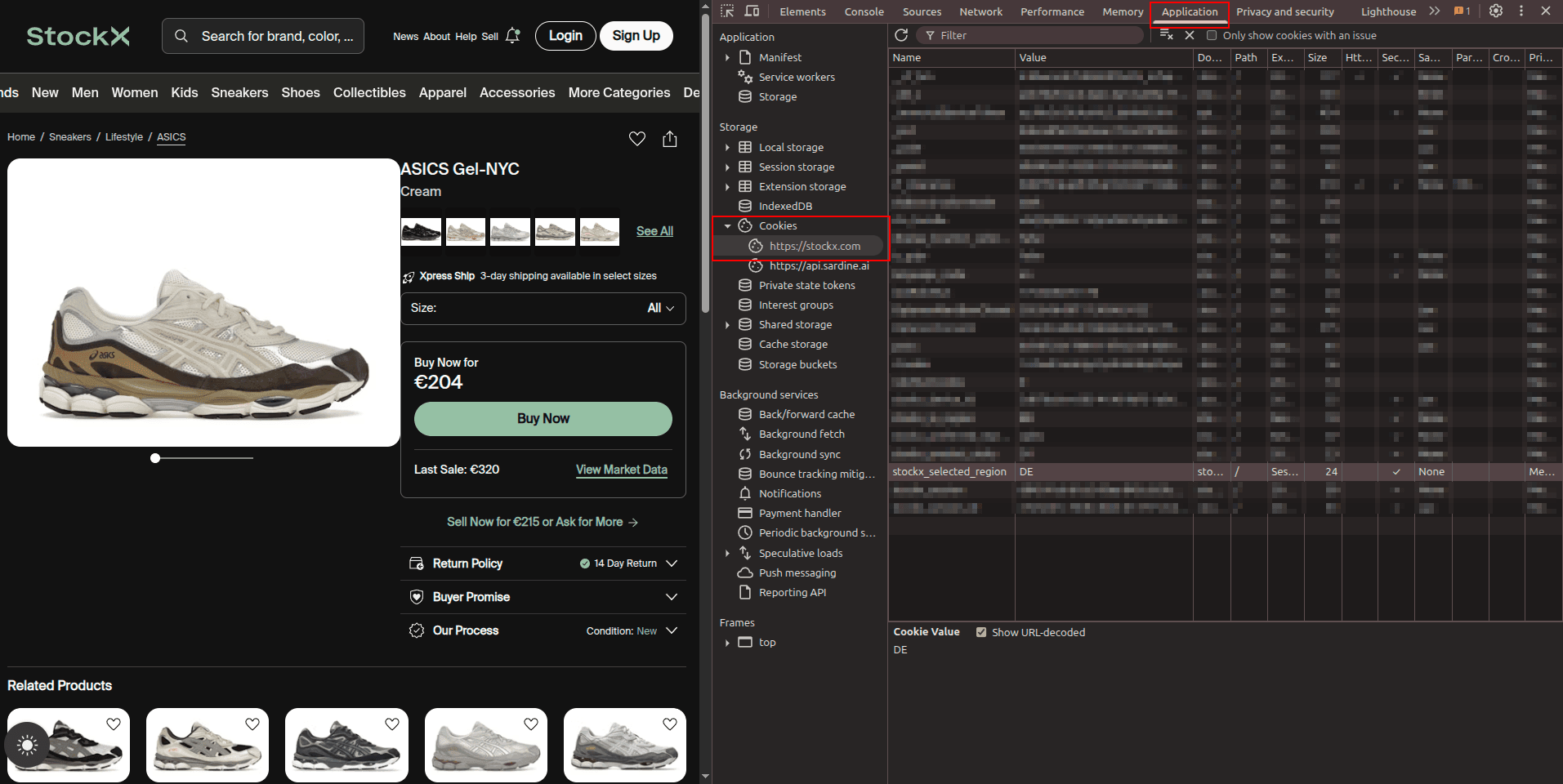 Add the localization cookie to your `Cookie` header. Use geolocation that matches your localization settings for consistency.
```python Python theme={null}
# pip install requests
import requests
url = 'https://stockx.com/asics-gel-nyc-cream'
apikey = 'YOUR_ZENROWS_API_KEY'
params = {
'url': url,
'apikey': apikey,
'js_render': 'true',
'premium_proxy': 'true',
'proxy_country': 'de', # Match geolocation to cookie setting
'custom_headers': 'true',
}
headers = {
'Cookie': 'stockx_selected_region=DE', # Set currency to EUR and Germany locale
}
response = requests.get('https://api.zenrows.com/v1/', params=params, headers=headers)
print(response.text)
```
## Best practices
### Start with minimal headers
Only add custom headers when necessary. Unnecessary headers can increase detection risk, especially with high-volume scraping. Start with no custom headers and add them only when you encounter specific blocking or need particular functionality.
### Analyze target behavior first
Before adding custom headers, check what the target website expects by examining real browser requests:
**Research workflow:**
1. Open the target URL in an **incognito/private browser tab**
2. Open **DevTools** (`F12`) and go to the **Network tab**
3. Reload the page and examine the request headers
4. For cookie-based functionality, check the **Application tab** in DevTools
5. Only include headers that are essential for your use case
### Header rotation for multiple requests
Vary headers across requests to avoid creating detectable patterns. Websites can detect if all requests come from the same referrer and may start blocking those requests. Rotating referrers helps simulate more natural browsing behavior from different traffic sources.
```python Python expandable theme={null}
import random
import time
import requests
def get_random_headers():
# Generate randomized headers for each request
referrers = [
'https://www.google.com',
'https://www.bing.com',
'https://duckduckgo.com',
'https://www.yahoo.com',
'https://twitter.com',
]
return {
'Referer': random.choice(referrers),
}
def scrape_with_rotation(urls):
# Scrape multiple URLs with randomized headers
results = []
for url in urls:
headers = get_random_headers()
response = requests.get('https://api.zenrows.com/v1/',
params={
'url': url,
'apikey': 'YOUR_ZENROWS_API_KEY',
'custom_headers': 'true',
},
headers=headers
)
results.append({
'url': url,
'content': response.text,
'headers_used': headers,
})
# Add delay between requests to avoid rate limiting
time.sleep(random.uniform(1, 3))
return results
# Example usage
urls_to_scrape = [
'https://example.com/page1',
'https://example.com/page2',
'https://example.com/page3',
]
results = scrape_with_rotation(urls_to_scrape)
for result in results:
print(f"Scraped {result['url']} using referrer: {result['headers_used']['Referer']}")
```
## Troubleshooting
### Common header issues and solutions
| Issue | Cause | Solution |
| ------------------------------- | ----------------------------- | ------------------------------------------------------------------ |
| Headers ignored | `custom_headers=true` not set | Add `custom_headers=true` to request parameters |
| Authentication fails | Incorrect cookie format | Format cookies as proper cookie string: `key1=value1; key2=value2` |
| 403 Forbidden errors | Missing required headers | Check target website's requirements and include necessary headers |
| Localization not working | Wrong cookie format or value | Use DevTools to find correct cookie names and values |
| Session expired quickly | IP mismatch in cookies | Use `session_id` or obtain cookies through ZenRows and reuse them |
| Headers not taking effect | Conflicting header values | Ensure headers are consistent and don't contradict each other |
| Website rate limiting triggered | Same headers for all requests | Rotate headers across requests to simulate natural browsing |
### Debugging header problems
When headers aren't working as expected:
Some websites only allow access to specific pages if you first visit another page. This is because the initial page sets cookies necessary for subsequent pages.
Example: Amazon product page accessed from search results
```python Python theme={null}
# pip install requests
import requests
url = 'https://www.amazon.com/dp/B00HPAIY6A'
apikey = 'YOUR_ZENROWS_API_KEY'
params = {
'url': url,
'apikey': apikey,
'custom_headers': 'true',
}
headers = {
'Referer': 'https://www.amazon.com/s?k=brazilian+coffee', # Simulate search page origin
}
response = requests.get('https://api.zenrows.com/v1/', params=params, headers=headers)
print(response.text)
```
Alternatively, use `https://www.google.com` as a referrer to simulate traffic from search engines.
Ensure headers don't contradict each other:
```python theme={null}
# BAD: Conflicting content type expectations
conflicting_headers = {
'Accept': 'application/json',
'Content-Type': 'text/html', # Conflicts with Accept
}
# GOOD: Consistent headers
consistent_headers = {
'Accept': 'application/json',
'Content-Type': 'application/json',
}
```
## Pricing
The `custom_headers` parameter doesn't increase the request cost. The only features who increase request costs are the Premium Proxy and JavaScript Render.
You can monitor your ZenRows usage in multiple ways to stay informed about your account activity and prevent unexpected overages.
**Dashboard monitoring**: View real-time usage statistics, remaining requests, success rates, and request history on your [Analytics Page](https://app.zenrows.com/analytics/scraper-api). You can also set up usage alerts in your [notification settings](https://app.zenrows.com/account/notifications) to receive notifications when you approach your limits.
**Programmatic monitoring**: For automated monitoring in your applications, call the `/v1/subscriptions/self/details` endpoint with your API key in the `X-API-Key` header. This returns real-time usage data that you can integrate into your monitoring systems. [Learn more about the usage endpoint](https://docs.zenrows.com/universal-scraper-api/features/other#plan-usage).
**Response header monitoring**: Track your concurrency usage through response headers included with each request:
* `Concurrency-Limit`: Your maximum concurrent requests
* `Concurrency-Remaining`: Available concurrent request slots
* `X-Request-Cost`: Cost of the current request
## Frequently Asked Questions (FAQ)
Custom headers allow you to modify HTTP request headers like `Referer`, `Accept`, `Cookie`, or `Authorization` to control how the target server perceives your request. This is useful for handling authentication, simulating specific browser behaviors, requesting particular content types, bypassing certain restrictions, and maintaining session continuity across requests.
ZenRows automatically manages browser-environment headers, including `User-Agent`, `Accept-Encoding`, `Sec-Ch-Ua`, `Sec-Fetch-Mode`, `Sec-Fetch-Site`, `Sec-Fetch-User`, and other browser fingerprinting headers. These are optimized for high success rates and anti-bot protection, and cannot be customized to maintain consistency and reliability.
Headers like `User-Agent`, `Sec-Ch-Ua`, and `Accept-Encoding` are closely tied to browser behavior and fingerprinting. ZenRows manages these automatically to ensure they match the browser environment being simulated, preventing detection by anti-bot systems that check for inconsistencies between headers and actual browser capabilities.
Without `custom_headers=true`, any custom headers you include in your request will be ignored. ZenRows will use only its automatically managed headers. You must explicitly enable custom headers to have your additional headers included in the request to the target website.
Yes, custom headers work with both static requests and JavaScript rendering (`js_render=true`). The headers are applied to the initial page request and any subsequent requests made during JavaScript execution, providing consistent header behavior throughout the rendering process.
First, verify that `custom_headers=true` is set in your parameters. Then check that your header format is correct and matches what the target website expects. Use debugging tools like `httpbin.io/anything` to verify that your headers are being sent correctly. Compare your headers with those sent by a real browser using developer tools, and ensure you're not attempting to set headers that ZenRows manages automatically.
Yes, you can vary headers across requests to avoid creating detectable patterns. Generate different combinations of referrers, language preferences, and other allowed headers for each request. This helps simulate more natural browsing behavior and can improve success rates when scraping multiple pages or making repeated requests to the same site.
Add the localization cookie to your `Cookie` header. Use geolocation that matches your localization settings for consistency.
```python Python theme={null}
# pip install requests
import requests
url = 'https://stockx.com/asics-gel-nyc-cream'
apikey = 'YOUR_ZENROWS_API_KEY'
params = {
'url': url,
'apikey': apikey,
'js_render': 'true',
'premium_proxy': 'true',
'proxy_country': 'de', # Match geolocation to cookie setting
'custom_headers': 'true',
}
headers = {
'Cookie': 'stockx_selected_region=DE', # Set currency to EUR and Germany locale
}
response = requests.get('https://api.zenrows.com/v1/', params=params, headers=headers)
print(response.text)
```
## Best practices
### Start with minimal headers
Only add custom headers when necessary. Unnecessary headers can increase detection risk, especially with high-volume scraping. Start with no custom headers and add them only when you encounter specific blocking or need particular functionality.
### Analyze target behavior first
Before adding custom headers, check what the target website expects by examining real browser requests:
**Research workflow:**
1. Open the target URL in an **incognito/private browser tab**
2. Open **DevTools** (`F12`) and go to the **Network tab**
3. Reload the page and examine the request headers
4. For cookie-based functionality, check the **Application tab** in DevTools
5. Only include headers that are essential for your use case
### Header rotation for multiple requests
Vary headers across requests to avoid creating detectable patterns. Websites can detect if all requests come from the same referrer and may start blocking those requests. Rotating referrers helps simulate more natural browsing behavior from different traffic sources.
```python Python expandable theme={null}
import random
import time
import requests
def get_random_headers():
# Generate randomized headers for each request
referrers = [
'https://www.google.com',
'https://www.bing.com',
'https://duckduckgo.com',
'https://www.yahoo.com',
'https://twitter.com',
]
return {
'Referer': random.choice(referrers),
}
def scrape_with_rotation(urls):
# Scrape multiple URLs with randomized headers
results = []
for url in urls:
headers = get_random_headers()
response = requests.get('https://api.zenrows.com/v1/',
params={
'url': url,
'apikey': 'YOUR_ZENROWS_API_KEY',
'custom_headers': 'true',
},
headers=headers
)
results.append({
'url': url,
'content': response.text,
'headers_used': headers,
})
# Add delay between requests to avoid rate limiting
time.sleep(random.uniform(1, 3))
return results
# Example usage
urls_to_scrape = [
'https://example.com/page1',
'https://example.com/page2',
'https://example.com/page3',
]
results = scrape_with_rotation(urls_to_scrape)
for result in results:
print(f"Scraped {result['url']} using referrer: {result['headers_used']['Referer']}")
```
## Troubleshooting
### Common header issues and solutions
| Issue | Cause | Solution |
| ------------------------------- | ----------------------------- | ------------------------------------------------------------------ |
| Headers ignored | `custom_headers=true` not set | Add `custom_headers=true` to request parameters |
| Authentication fails | Incorrect cookie format | Format cookies as proper cookie string: `key1=value1; key2=value2` |
| 403 Forbidden errors | Missing required headers | Check target website's requirements and include necessary headers |
| Localization not working | Wrong cookie format or value | Use DevTools to find correct cookie names and values |
| Session expired quickly | IP mismatch in cookies | Use `session_id` or obtain cookies through ZenRows and reuse them |
| Headers not taking effect | Conflicting header values | Ensure headers are consistent and don't contradict each other |
| Website rate limiting triggered | Same headers for all requests | Rotate headers across requests to simulate natural browsing |
### Debugging header problems
When headers aren't working as expected:
Some websites only allow access to specific pages if you first visit another page. This is because the initial page sets cookies necessary for subsequent pages.
Example: Amazon product page accessed from search results
```python Python theme={null}
# pip install requests
import requests
url = 'https://www.amazon.com/dp/B00HPAIY6A'
apikey = 'YOUR_ZENROWS_API_KEY'
params = {
'url': url,
'apikey': apikey,
'custom_headers': 'true',
}
headers = {
'Referer': 'https://www.amazon.com/s?k=brazilian+coffee', # Simulate search page origin
}
response = requests.get('https://api.zenrows.com/v1/', params=params, headers=headers)
print(response.text)
```
Alternatively, use `https://www.google.com` as a referrer to simulate traffic from search engines.
Ensure headers don't contradict each other:
```python theme={null}
# BAD: Conflicting content type expectations
conflicting_headers = {
'Accept': 'application/json',
'Content-Type': 'text/html', # Conflicts with Accept
}
# GOOD: Consistent headers
consistent_headers = {
'Accept': 'application/json',
'Content-Type': 'application/json',
}
```
## Pricing
The `custom_headers` parameter doesn't increase the request cost. The only features who increase request costs are the Premium Proxy and JavaScript Render.
You can monitor your ZenRows usage in multiple ways to stay informed about your account activity and prevent unexpected overages.
**Dashboard monitoring**: View real-time usage statistics, remaining requests, success rates, and request history on your [Analytics Page](https://app.zenrows.com/analytics/scraper-api). You can also set up usage alerts in your [notification settings](https://app.zenrows.com/account/notifications) to receive notifications when you approach your limits.
**Programmatic monitoring**: For automated monitoring in your applications, call the `/v1/subscriptions/self/details` endpoint with your API key in the `X-API-Key` header. This returns real-time usage data that you can integrate into your monitoring systems. [Learn more about the usage endpoint](https://docs.zenrows.com/universal-scraper-api/features/other#plan-usage).
**Response header monitoring**: Track your concurrency usage through response headers included with each request:
* `Concurrency-Limit`: Your maximum concurrent requests
* `Concurrency-Remaining`: Available concurrent request slots
* `X-Request-Cost`: Cost of the current request
## Frequently Asked Questions (FAQ)
Custom headers allow you to modify HTTP request headers like `Referer`, `Accept`, `Cookie`, or `Authorization` to control how the target server perceives your request. This is useful for handling authentication, simulating specific browser behaviors, requesting particular content types, bypassing certain restrictions, and maintaining session continuity across requests.
ZenRows automatically manages browser-environment headers, including `User-Agent`, `Accept-Encoding`, `Sec-Ch-Ua`, `Sec-Fetch-Mode`, `Sec-Fetch-Site`, `Sec-Fetch-User`, and other browser fingerprinting headers. These are optimized for high success rates and anti-bot protection, and cannot be customized to maintain consistency and reliability.
Headers like `User-Agent`, `Sec-Ch-Ua`, and `Accept-Encoding` are closely tied to browser behavior and fingerprinting. ZenRows manages these automatically to ensure they match the browser environment being simulated, preventing detection by anti-bot systems that check for inconsistencies between headers and actual browser capabilities.
Without `custom_headers=true`, any custom headers you include in your request will be ignored. ZenRows will use only its automatically managed headers. You must explicitly enable custom headers to have your additional headers included in the request to the target website.
Yes, custom headers work with both static requests and JavaScript rendering (`js_render=true`). The headers are applied to the initial page request and any subsequent requests made during JavaScript execution, providing consistent header behavior throughout the rendering process.
First, verify that `custom_headers=true` is set in your parameters. Then check that your header format is correct and matches what the target website expects. Use debugging tools like `httpbin.io/anything` to verify that your headers are being sent correctly. Compare your headers with those sent by a real browser using developer tools, and ensure you're not attempting to set headers that ZenRows manages automatically.
Yes, you can vary headers across requests to avoid creating detectable patterns. Generate different combinations of referrers, language preferences, and other allowed headers for each request. This helps simulate more natural browsing behavior and can improve success rates when scraping multiple pages or making repeated requests to the same site.