> ## Documentation Index
> Fetch the complete documentation index at: https://docs.zenrows.com/llms.txt
> Use this file to discover all available pages before exploring further.

# Capture Network Requests (XHR/Fetch)

> Intercept XHR and Fetch API network requests to extract structured JSON data from JavaScript-heavy dynamic websites using ZenRows.

Many modern websites load data dynamically through background API calls rather than including everything in the initial HTML. These XHR (XMLHttpRequest) and Fetch requests often contain the exact data you need in a clean JSON format, making them more reliable than scraping HTML elements.

This guide shows you how to identify and capture these network requests using two ZenRows approaches: the Universal Scraper API for simple integration, and the Scraping Browser for advanced control.

<Warning>
  While ZenRows can capture XHR/Fetch requests during page rendering, this feature is designed as a supplementary capability rather than our core offering. ZenRows specializes in HTML content extraction and JavaScript rendering for traditional web scraping scenarios.

  This guide demonstrates the capability for educational purposes and specific use cases where understanding background API calls enhances your web scraping strategy.
</Warning>

## Who is this for?

This guide is for developers who need to extract data from websites that load content dynamically through JavaScript and API calls, such as infinite scroll pages, search results, or real-time data feeds.

## What you'll learn

* Identify XHR/Fetch requests using browser developer tools
* Capture network requests with the Universal Scraper API
* Use the Scraping Browser to intercept and analyze API calls

## Understanding Network Requests

The first step is understanding which network requests load the data you need. We'll use Chrome's Developer Tools to monitor network activity and identify the relevant API calls.

Let's use a practical example with a "Load More" page:

<Steps>
  <Step title="Open Developer Tools">
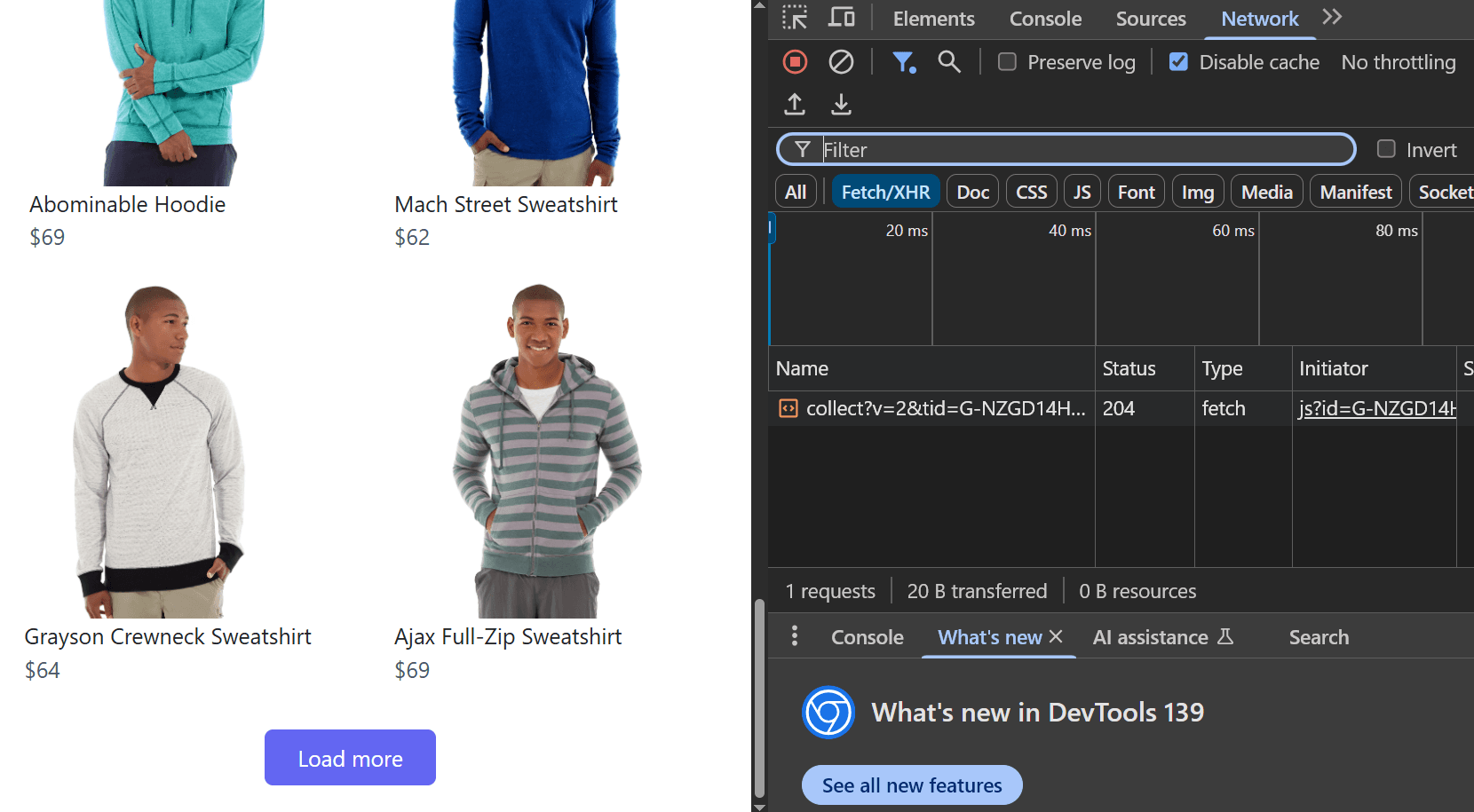
    1. Navigate to [https://www.scrapingcourse.com/button-click](https://www.scrapingcourse.com/button-click)
    2. Right-click anywhere on the page and select **Inspect**
    3. Go to **Network** → **Fetch/XHR**
    <Frame>
      <img src="https://static.zenrows.com/content/chrome_network_inspection_756070072c.png" style={{ borderRadius: '0.5rem' }} alt="Chrome Network Inspection" />
    </Frame>
  </Step>

  <Step title="Trigger Network Activity">
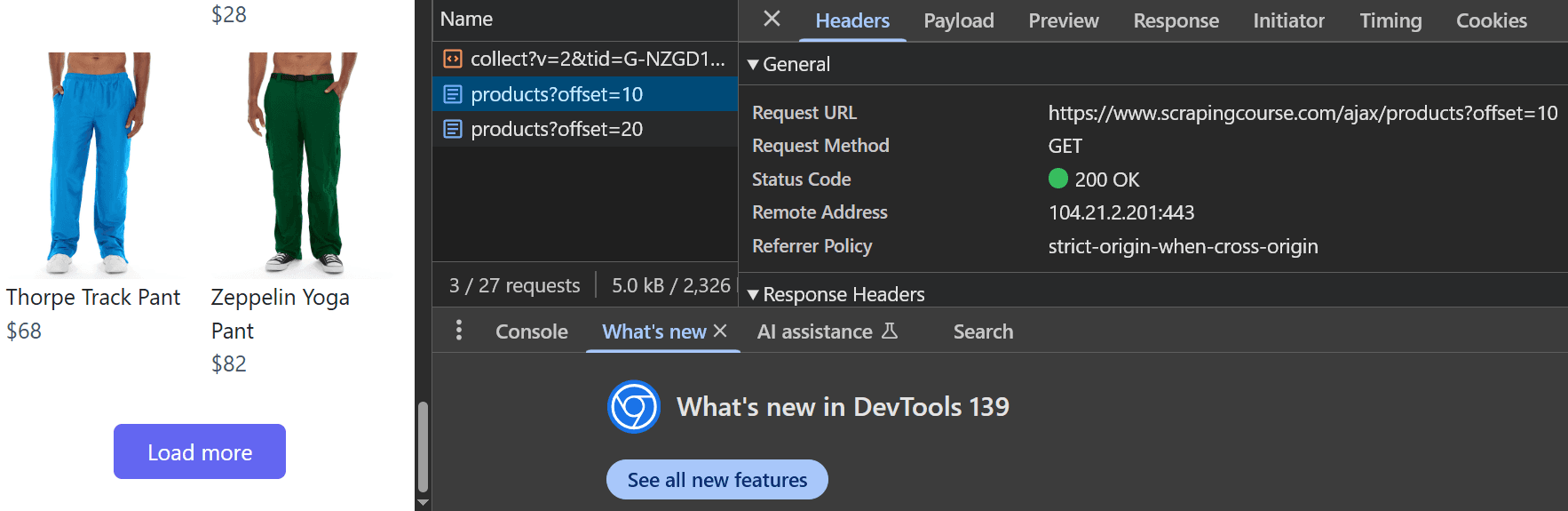
    1. Click the **Load More** button on the site to trigger a data-loading event
    2. Observe the changes in the Fetch/XHR calls
    3. Each click calls a `products?offset` API as shown in the image below
    4. Click one of the offset requests to view the API endpoint that was called
    <Frame>
      <img src="https://static.zenrows.com/content/load_more_api_network_f5b678bb2a.png" style={{ borderRadius: '0.5rem' }} alt="Load More API Network" />
    </Frame>
  </Step>

  <Step title="Analyze the API Endpoint">
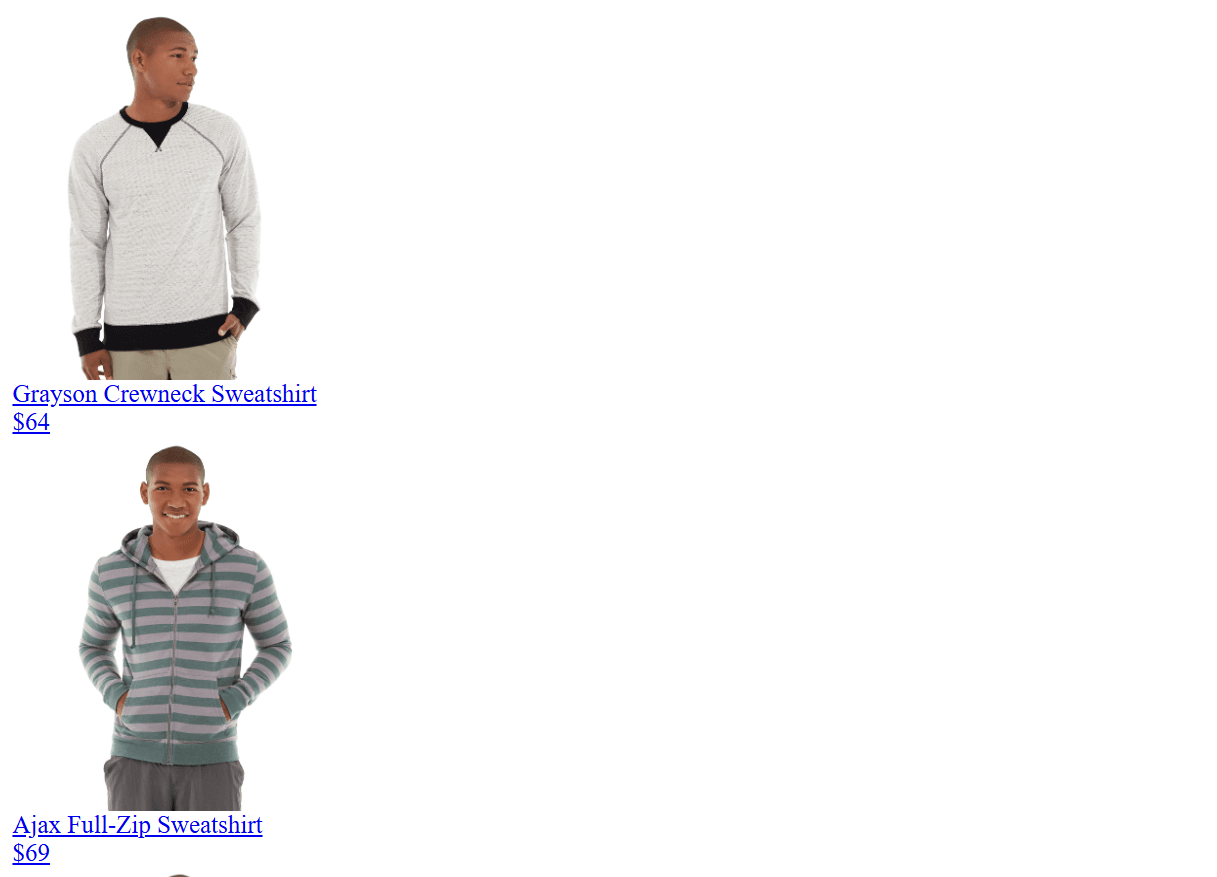
    The network inspection shows that the requested API endpoint is: `https://www.scrapingcourse.com/ajax/products?offset=10`

    Opening this URL directly in your browser returns the raw data without visual design:
    <Frame>
      <img src="https://static.zenrows.com/content/api_call_no_visual_design_658cf0bfb6.png" style={{ borderRadius: '0.5rem' }} alt="API Call No Visual Design" />
    </Frame>

    The `offset` query parameter determines which set of data is loaded. For example:

    * `offset=0` loads the initial data visible in the viewport
    * `offset=10` loads the next set of products
    * `offset=50` loads data for the sixth scroll position
  </Step>
</Steps>

<Note>Network request behavior can vary significantly between websites. Some endpoints may return HTML pages, while others provide JSON or different data formats. Always inspect the specific network responses of your target site to determine the appropriate handling method.</Note>

## Method 1: Universal Scraper API

The Universal Scraper API provides the simplest way to capture network requests. Use the `json_response` parameter to automatically capture all XHR/Fetch requests made during page rendering, combined with `js_instructions` to trigger the necessary interactions.

```python Python theme={null}
# pip install requests
import requests

url = 'https://www.scrapingcourse.com/button-click'
apikey = 'YOUR_ZENROWS_API_KEY'
params = {
    'url': url,
    'apikey': apikey,
	'js_render': 'true',
	'json_response': 'true', # Capture network requests made during page render
	'js_instructions': """[
        {"wait_for":"#load-more-btn"},
        {"click":"#load-more-btn"},
        {"wait":1000}
    ]""",
	'premium_proxy': 'true',
}
response = requests.get('https://api.zenrows.com/v1/', params=params)
print(response.text)
```

<Note>You can find more information about the JavaScript Instructions parameter in the [JavaScript Instructions](/universal-scraper-api/features/js-instructions) and JSON Response parameters in the [JSON Response](/universal-scraper-api/features/json-response) documentation pages.</Note>

Response example:

```json JSON Response theme={null}
{
  "html": "<html><body><h1>..... HTML content .....</h1></body></html>",
  "xhr": [
    ... other XHR requests ...
    {
      "url": "https://www.scrapingcourse.com/ajax/products?offset=10",
      "body": "<div class=\"product-item flex flex-col items-center rounded-lg\">...</div>...</body></html>",
      "status_code": 200,
      "method": "GET",
      "headers": {
        headers ...
      },
      "request_headers": {
        "Referer": "https://www.scrapingcourse.com/button-click",
        request_headers ...
      }
    }
  ],
  "js_instructions_report": { ... other JavaScript Instructions report ... }
}
```

## Method 2: Scraping Browser

The Scraping Browser provides more control over network request capture and allows you to process requests in real-time as they occur. It is recommended to use the Scraping Browser for more complex scraping tasks or when the Universal Scraper API is not enough.

<CodeGroup>
  ```javascript Puppeteer expandable theme={null}
  import { connect } from 'puppeteer-core';

  async function captureNetworkRequests(url) {
      const browser = await connect({
          browserWSEndpoint: 'wss://browser.zenrows.com?apikey=YOUR_ZENROWS_API_KEY'
      });

      const page = await browser.newPage();

      // Array to store captured requests
      const capturedRequests = [];

      // Intercept network requests
      await page.setRequestInterception(true);

      page.on('request', (request) => {
          // Log outgoing requests
          console.log(`Request: ${request.method()} ${request.url()}`);
          request.continue();
      });

      page.on('response', async (response) => {
          const url = response.url();
          const method = response.request().method();
          const status = response.status();

          // Filter for XHR/Fetch requests (adjust as needed)
          if (
              url.includes('api') || url.includes('ajax') ||
              response.request().resourceType() === 'xhr' ||
              response.request().resourceType() === 'fetch'
          ) {
              try {
                  const responseBody = await response.text();
                  const headers = response.headers();
                  const requestHeaders = response.request().headers();

                  capturedRequests.push({
                      url: url,
                      method: method,
                      status_code: status,
                      body: responseBody,
                      headers: headers,
                      request_headers: requestHeaders,
                      resource_type: response.request().resourceType()
                  });

                  console.log(`Captured: ${method} ${url} (${status})`);
              } catch (error) {
                  console.error(`Error capturing response from ${url}:`, error);
              }
          }
      });

      try {
          // Navigate to the page with increased timeout
          await page.goto(url, { waitUntil: 'networkidle2', timeout: 60000 });

          // Wait for the "load more" button to be visible
          await page.waitForSelector('#load-more-btn', { visible: true, timeout: 30000 });

          // Wait for the AJAX request after clicking the button
          const [ajaxResponse] = await Promise.all([
              page.waitForResponse(
                  response =>
                      response.url().includes('/ajax/products?offset=10') &&
                      response.status() === 200,
                  { timeout: 20000 }
              ),
              page.click('#load-more-btn')
          ]);

          // Optionally: Log the AJAX response body directly
          const ajaxBody = await ajaxResponse.text();
          console.log('AJAX Response Body:', ajaxBody);

          // Wait a bit for any additional network activity
          await page.waitForTimeout(3000);

          // Get the final HTML
          const html = await page.content();

          return {
              html: html,
              xhr_requests: capturedRequests
          };
      } catch (error) {
          console.error('Error during capture:', error);
          throw error;
      } finally {
          await browser.close();
      }
  }

  // Usage
  captureNetworkRequests('https://www.scrapingcourse.com/button-click')
      .then(result => {
          console.log(`Captured ${result.xhr_requests.length} network requests`);

          result.xhr_requests.forEach((request, index) => {
              console.log(`\nRequest ${index + 1}:`);
              console.log(`URL: ${request.url}`);
              console.log(`Method: ${request.method}`);
              console.log(`Status: ${request.status_code}`);

              // Try to parse JSON response
              try {
                  const jsonData = JSON.parse(request.body);
                  console.log('JSON Response:', JSON.stringify(jsonData, null, 2));
              } catch (e) {
                  console.log('Raw Response:', request.body.substring(0, 200) + '...');
              }

              // Special print for the request you care about
              if (request.url.includes('/ajax/products?offset=10')) {
                  console.log('\n*** This is the AJAX call you wanted! ***');
                  console.log('Full internals:');
                  console.log(JSON.stringify(request, null, 2));
              }
          });
      })
      .catch(error => {
          console.error('Error:', error);
      });
  ```

  ```javascript Playwright expandable theme={null}
  const { chromium } = require('playwright'); // or 'playwright-core'

  async function captureNetworkRequests(url) {
      const browser = await chromium.connectOverCDP('wss://browser.zenrows.com?apikey=YOUR_ZENROWS_API_KEY');

      const context = await browser.newContext();
      const page = await context.newPage();

      const capturedRequests = [];

      // Listen for all responses
      page.on('response', async (response) => {
          try {
              const req = response.request();
              const url = response.url();
              const method = req.method();
              const status = response.status();
              const resourceType = req.resourceType();

              // Filter for XHR/Fetch requests (adjust as needed)
              if (
                  url.includes('api') || url.includes('ajax') ||
                  resourceType === 'xhr' || resourceType === 'fetch'
              ) {
                  let responseBody;
                  try {
                      responseBody = await response.text();
                  } catch (e) {
                      responseBody = '[Could not retrieve body]';
                  }

                  capturedRequests.push({
                      url: url,
                      method: method,
                      status_code: status,
                      body: responseBody,
                      headers: response.headers(),
                      request_headers: req.headers(),
                      resource_type: resourceType
                  });

                  console.log(`Captured: ${method} ${url} (${status})`);
              }
          } catch (err) {
              console.error('Error in response handler:', err);
          }
      });

      try {
          // Go to the page
          await page.goto(url, { waitUntil: 'networkidle', timeout: 60000 });

          // Wait for the button to be visible
          await page.waitForSelector('#load-more-btn', { state: 'visible', timeout: 30000 });

          // Wait for the AJAX request after clicking the button
          const [ajaxResponse] = await Promise.all([
              page.waitForResponse(
                  response =>
                      response.url().includes('/ajax/products?offset=10') &&
                      response.status() === 200,
                  { timeout: 20000 }
              ),
              page.click('#load-more-btn')
          ]);

          // Optionally: Log the AJAX response body directly
          const ajaxBody = await ajaxResponse.text();
          console.log('AJAX Response Body:', ajaxBody);

          // Wait a bit for any additional network activity
          await page.waitForTimeout(3000);

          // Get the final HTML
          const html = await page.content();

          await browser.close();

          return {
              html: html,
              xhr_requests: capturedRequests
          };
      } catch (error) {
          await browser.close();
          console.error('Error during capture:', error);
          throw error;
      }
  }

  // Usage
  captureNetworkRequests('https://www.scrapingcourse.com/button-click')
      .then(result => {
          console.log(`Captured ${result.xhr_requests.length} network requests`);

          result.xhr_requests.forEach((request, index) => {
              console.log(`\nRequest ${index + 1}:`);
              console.log(`URL: ${request.url}`);
              console.log(`Method: ${request.method}`);
              console.log(`Status: ${request.status_code}`);

              // Try to parse JSON response
              try {
                  const jsonData = JSON.parse(request.body);
                  console.log('JSON Response:', JSON.stringify(jsonData, null, 2));
              } catch (e) {
                  console.log('Raw Response:', request.body.substring(0, 200) + '...');
              }

              // Special print for the request you care about
              if (request.url.includes('/ajax/products?offset=10')) {
                  console.log('\n*** This is the AJAX call you wanted! ***');
                  console.log('Full internals:');
                  console.log(JSON.stringify(request, null, 2));
              }
          });
      })
      .catch(error => {
          console.error('Error:', error);
      });
  ```

  ```python Pyppeteer expandable theme={null}
  import asyncio
  from pyppeteer import connect

  async def capture_network_requests(url):
      browser = await connect(
          browserWSEndpoint='wss://browser.zenrows.com?apikey=YOUR_ZENROWS_API_KEY'
      )
      page = await browser.newPage()
      captured_requests = []

      # Intercept network requests
      await page.setRequestInterception(True)

      async def on_request(request):
          print(f"Request: {request.method} {request.url}")
          await request.continue_()

      async def on_response(response):
          req = response.request
          url_ = response.url
          method = req.method
          status = response.status
          resource_type = req.resourceType

          # Filter for XHR/Fetch requests
          if (
              'api' in url_ or 'ajax' in url_ or
              resource_type in ['xhr', 'fetch']
          ):
              try:
                  responseBody = await response.text()
              except Exception:
                  responseBody = '[Could not retrieve body]'
              headers = response.headers
              request_headers = req.headers

              captured_requests.append({
                  'url': url_,
                  'method': method,
                  'status_code': status,
                  'body': responseBody,
                  'headers': headers,
                  'request_headers': request_headers,
                  'resource_type': resource_type
              })
              print(f"Captured: {method} {url_} ({status})")

      page.on('request', on_request)
      page.on('response', on_response)

      try:
          # Navigate to the page with increased timeout
          await page.goto(url, waitUntil='networkidle2', timeout=60000)

          # Wait for the "load more" button to be visible
          await page.waitForSelector('#load-more-btn', visible=True, timeout=30000)

          # Wait for the AJAX request after clicking the button
          async def ajax_predicate(response):
              return (
                  '/ajax/products?offset=10' in response.url and
                  response.status == 200
              )

          wait_for_ajax = page.waitForResponse(ajax_predicate, timeout=20000)
          await page.click('#load-more-btn')
          ajax_response = await wait_for_ajax

          ajax_body = await ajax_response.text()
          print('AJAX Response Body:', ajax_body)

          # Wait a bit for any additional network activity
          await asyncio.sleep(3)

          # Get the final HTML
          html = await page.content()

          await browser.disconnect()

          return {
              'html': html,
              'xhr_requests': captured_requests
          }
      except Exception as e:
          await browser.disconnect()
          print('Error during capture:', e)
          raise

  # Usage
  async def main():
      result = await capture_network_requests('https://www.scrapingcourse.com/button-click')
      print(f"Captured {len(result['xhr_requests'])} network requests")

      for idx, request in enumerate(result['xhr_requests'], 1):
          print(f"\nRequest {idx}:")
          print(f"URL: {request['url']}")
          print(f"Method: {request['method']}")
          print(f"Status: {request['status_code']}")

          # Try to parse JSON response
          try:
              import json
              jsonData = json.loads(request['body'])
              print('JSON Response:', json.dumps(jsonData, indent=2))
          except Exception:
              print('Raw Response:', request['body'][:200] + '...')

          # Special print for the request you care about
          if '/ajax/products?offset=10' in request['url']:
              print('\n*** This is the AJAX call you wanted! ***')
              print('Full internals:')
              import pprint
              pprint.pprint(request)

  if __name__ == '__main__':
      asyncio.get_event_loop().run_until_complete(main())

  ```
</CodeGroup>

## Best Practices

**Request Filtering**:

* Filter by URL patterns to capture only relevant API calls
* Use resource type filtering to focus on XHR/Fetch requests
* Monitor specific endpoints that contain the data you need

**Performance Optimization**:

* Set appropriate `wait` times to ensure all requests complete
* Use targeted selectors in `wait_for` instructions
* Limit capture duration to avoid unnecessary data collection

**Data Processing**

* Parse JSON responses when possible for structured data
* Handle different response formats (JSON, XML, HTML)
* Store request metadata (headers, status codes) for debugging

**Error Handling**:

* Implement retry logic for failed network captures
* Validate captured data before processing
* Log network errors for troubleshooting

## Troubleshooting

**No XHR requests captured**:

* Ensure `js_render` is enabled
* Increase `wait` times to allow requests to complete
* Check if the target element exists and is clickable
* Verify that JavaScript is required to load the content

**Missing authentication in captured requests**:

* Use `custom_headers` parameter with the Universal Scraper API
* Set headers before navigation with the Scraping Browser
* Check if the site requires cookies or session tokens

**Incomplete request data**:

* Increase the `wait` parameter to allow all requests to finish
* Use `wait_for` with specific selectors instead of fixed timeouts
* Monitor the network tab to understand the request timing

**Request filtering not working**:

* Adjust URL pattern matching for your specific target site
* Check the `resource_type` of requests you want to capture
* Use broader filters initially, then narrow down based on results
