

Overview
Combine Google’s Agent Development Kit (ADK) with the ZenRows MCP server to build autonomous, multi-agent workflows that can read any website in real time. ADK has native MCP support via theMcpToolset class, so connecting ZenRows takes a single block of code. No function-calling boilerplate, no scraping infrastructure, and no anti-bot tuning required.
This guide covers ADK with Python. ADK also supports TypeScript, Java, Go, and Kotlin. The same MCP integration pattern applies across all of them.
What is Google ADK?
Google’s Agent Development Kit (ADK) is an open-source, code-first framework for building, evaluating, and deploying AI agents. It is model-agnostic and deployment-agnostic, and it is optimized for Google’s Gemini models while supporting Claude, GPT, and 100+ other LLMs via LiteLLM. ADK provides primitives for agent orchestration (LlmAgent, workflow agents, multi-agent collaboration), tools (function tools, MCP tools, OpenAPI tools), sessions, memory, and deployment to Vertex AI Agent Engine, Cloud Run, and GKE.
Adding ZenRows MCP gives every ADK agent real-time access to any website, including JavaScript-heavy and bot-protected ones.
Key benefits
Native MCP support
ADK’s
McpToolset wrapper takes the ZenRows server URL and your API key. The agent discovers ZenRows’ tools (scrape and 30+ browser automation tools) automatically, with no schema mapping to maintain.Autonomous multi-step tasks
ADK agents can scrape one page, decide what to scrape next based on what they read, and chain browser interactions like form fills and clicks across multiple pages. ADK runs the orchestration loop for you.
Anti-bot bypass on every tool call
Premium residential proxies, JavaScript rendering, and stealth fingerprinting come standard. Your ADK agents reach JavaScript-heavy SPAs, Cloudflare-protected sites, and geo-restricted pages without configuration.
Composes with ADK's full primitive set
ZenRows tools work alongside multi-agent workflows, sequential and parallel agents, sessions, memory, callbacks, evaluation, and tracing. Pass them to one agent or many; the integration is the same.
Deploys cleanly to Google Cloud
ADK has first-class deployment paths to Vertex AI Agent Engine, Cloud Run, and GKE. Because the ZenRows MCP server is hosted, your deployed ADK agent connects to it over HTTP, with no MCP server to package or run alongside your agent container.
Use cases
The Google ADK and ZenRows combination unlocks a wide range of agent workflows:Autonomous research agents
Autonomous research agents
Agents that visit multiple URLs, follow citations, and synthesize findings from across the web into a single brief.
Lead enrichment pipelines on Vertex AI
Lead enrichment pipelines on Vertex AI
ADK agents deployed to Agent Engine that take a company name, scrape the company website, find pricing pages and product launches, and write enriched profiles into BigQuery or your CRM.
Multi-agent web automation
Multi-agent web automation
A research agent that gathers information and hands off to a writing agent that produces the final report, both pulling from live web data. ADK’s sequential and collaborative workflows make this pattern trivial.
Competitive monitoring on Cloud Run
Competitive monitoring on Cloud Run
Scheduled ADK agents that periodically check competitor pricing pages, blog posts, and changelogs, then surface what has changed since the last run.
Form-filling and extraction agents
Form-filling and extraction agents
Agents that navigate multi-step checkout flows, login-walled forms, or job applications using ZenRows’ browser tools.
Getting started
Build a single ADK agent equipped with ZenRows MCP that can answer questions by reading any website in real time.Prerequisites
- Python 3.10 or higher
- A ZenRows API key (Find it in your ZenRows dashboard)
- A Google API key
Setup
Create your environment file
Create a
.env file in the parent folder of your agent directory with your API keys..env
Set up the directory structure
ADK uses a standard directory layout. Create the following structure:
Create the agent
Add a re-export in
__init__.py, then create the agent in agent.py.__init__.py
agent.py
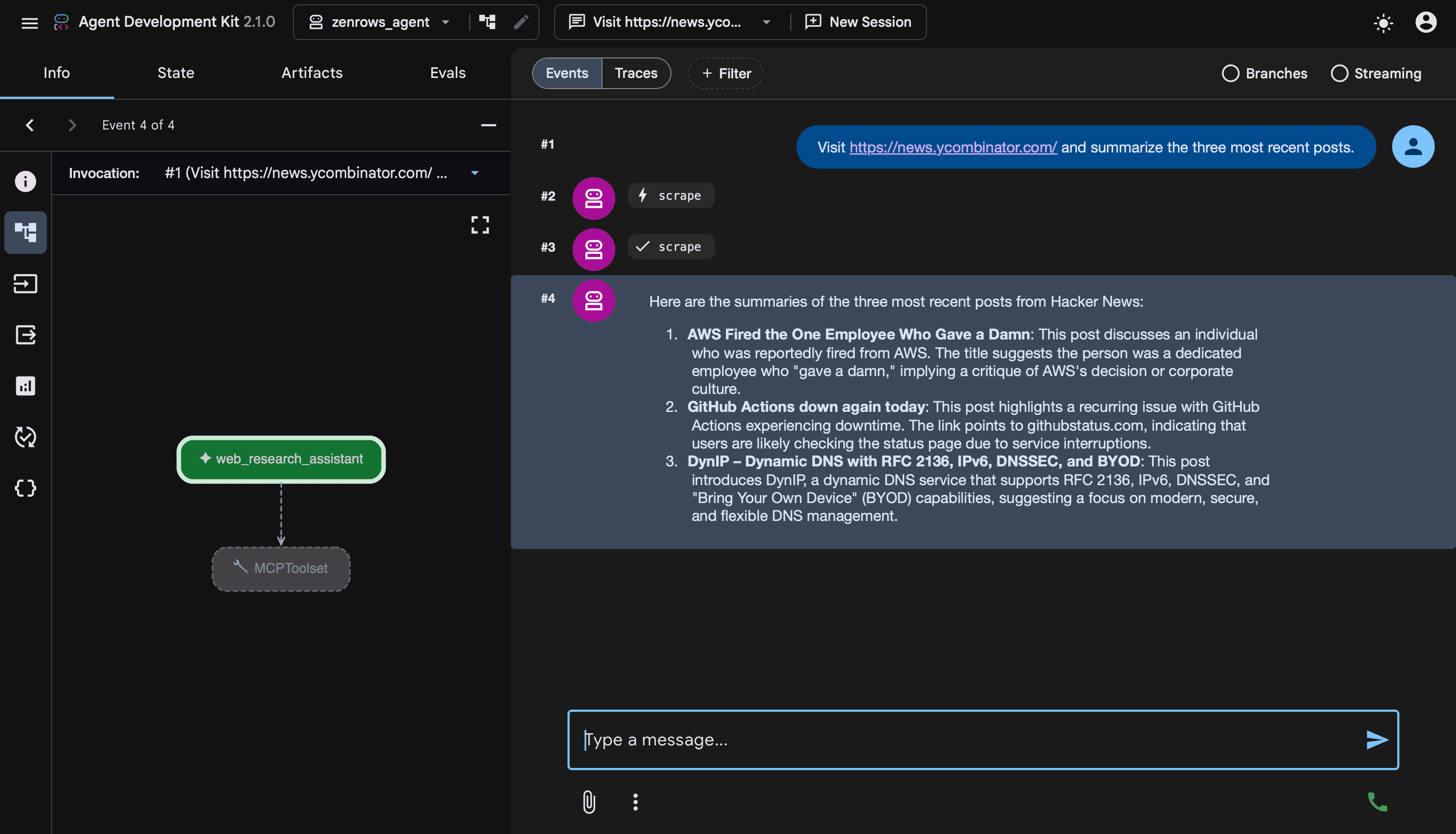
How it works
MCPToolsetregisters the ZenRows hosted MCP server as a tool source.StreamableHTTPConnectionParamspoints at the ZenRows MCP endpoint and carries your API key as an OAuth Bearer token in theAuthorizationheader.- On startup,
MCPToolsetqueries the ZenRows server for its available tools and adapts each one to ADK’s tool schema. The agent gets access toscrape,browser_navigate,browser_click, and 30+ other ZenRows tools with no extra configuration. LlmAgentequips the Gemini model with the toolset. The agent reads the prompt, picks the right tool, calls it throughMCPToolset, gets the content back, and writes the answer.
Advanced usage
Autonomous research agent
The real power of ADK is letting an agent decide for itself which tools to call across multiple steps. With ZenRows MCP, that means the agent can autonomously read several pages, follow links it finds interesting, and synthesize findings, all from a single prompt. The example below builds a research agent that visits a topic landing page, identifies the most relevant linked articles, scrapes each one, and produces a synthesized report. This version uses ADK’s programmaticRunner instead of adk web, which is the pattern to use in production code or when embedding ADK into your own application.
Python
Multi-agent workflows
Because ZenRows MCP is a standard ADK tool, you can share it across multiple agents and combine it with ADK’s multi-agent patterns. A common setup is one agent for research (with ZenRows access) and another for writing (without web tools).Python
Troubleshooting
-
424 Failed Dependencyor401 Unauthorizedfrom the MCP server- Confirm the
Authorization: Bearer YOUR_ZENROWS_API_KEYheader is present in theheadersdict onStreamableHTTPConnectionParams. - Verify your key in the ZenRows dashboard and confirm your subscription has remaining quota.
- Confirm the URL is exactly
https://mcp.zenrows.com/mcp.
- Confirm the
-
Empty tool list when starting the agent
If
adk webshows the agent but no ZenRows tools appear in tool calls, the connection to the MCP server failed silently.- Check your API key, the URL, and your network connectivity.
- Look at the
adk webconsole output.MCPToolsetlogslist_toolserrors there.
-
Agent repeatedly scrapes the same page
Add explicit guidance in the agent’s
instructionabout what to do once it has the data. For example,"After scraping each URL once, summarize and stop." -
Deployment fails with Agent Definition Must Be Synchronous
ADK requires agents that use MCP tools to be defined at module load time. If you have an
async def get_agent()factory, refactor soroot_agentis a module-level variable instantiated synchronously. -
Page blocked or data missing in scraped content
If the agent connects and invokes tools correctly but the scraped content comes back blocked or incomplete, the issue is on the target page rather than the MCP connection.
Add explicit guidance to your agent’s instruction. For example,
"When scraping, ask ZenRows to use JavaScript rendering and Premium Proxies for protected sites."
FAQ (Frequently Asked Questions)
What's the difference between using ADK with ZenRows MCP versus calling the Universal Scraper API directly?
What's the difference between using ADK with ZenRows MCP versus calling the Universal Scraper API directly?
Calling the Universal Scraper API directly works for any Python script. With ADK + ZenRows MCP, you get autonomous agent behavior on top: ADK decides which tool to call, chains multiple calls in a single run, handles multi-step workflows, and integrates with ADK’s session, memory, and deployment infrastructure.Use direct API calls for simple deterministic scripts. Use ADK + MCP when you want agent autonomy.
Which Gemini model should I use?
Which Gemini model should I use?
For simple agents,
gemini-2.5-flash is fast and cost-effective. For autonomous multi-step research and complex reasoning, gemini-2.5-pro is a better fit. You can also use Claude, GPT, or any LiteLLM-supported model through ADK’s model routing if you want to mix providers within the same workflow.Can I use ADK's TypeScript, Java, Go, or Kotlin SDKs with ZenRows MCP?
Can I use ADK's TypeScript, Java, Go, or Kotlin SDKs with ZenRows MCP?
Yes. The
MCPToolset class exists across all ADK language bindings, and the underlying transport (Streamable HTTP) is language-agnostic. Provide the URL https://mcp.zenrows.com/mcp, set the Authorization: Bearer YOUR_ZENROWS_API_KEY header, and the toolset discovers ZenRows’ tools automatically. See the ADK MCP tools guide for language-specific syntax.Can I use the local stdio version of ZenRows MCP with ADK?
Can I use the local stdio version of ZenRows MCP with ADK?
Yes. Use
StdioConnectionParams with the @zenrows/mcp npm package instead of StreamableHTTPConnectionParams. The remote URL is recommended because it requires no local install, no Node.js dependency, and runs the same way in development and production. See the ZenRows MCP overview for the local stdio configuration.Are MCP tool calls captured in ADK's tracing?
Are MCP tool calls captured in ADK's tracing?
Yes. ADK’s tracing captures every MCP
list_tools and call_tool invocation alongside the rest of the agent’s events. You can view them in OpenTelemetry-compatible backends or in Vertex AI Agent Engine’s built-in observability when deployed there.